Power dialler vs manual calling is the first real decision most Australian outbound teams make once they move past a shared spreadsheet and a handful of mobiles. Manual calling means a rep finds the next number, taps it in, waits, talks, writes notes and then goes looking for the next one. A power dialler takes the finding and the tapping off the rep's plate, so the next number in the list rings as soon as they are ready.
Both approaches can work, and both can be done badly. This guide compares them on the five things that decide whether a calling block is productive: time per call, dials per hour, notes and follow-up, recording, and how much a manager can see. Where we use numbers, they come from a worked example with the assumptions written out, so you can swap in your own and see whether the switch is worth it for your team.
How manual calling and power dialling differ
What manual calling looks like in practice
On a typical manual setup, the list lives in a spreadsheet or a CRM tab. The rep scrolls to the next row, copies or reads the number, dials it on a mobile or desk phone, and listens to it ring. If nobody answers, they jot "NA" in a column and scroll on. If someone answers, they talk, hang up, then type notes while the conversation is still fresh. Every one of those steps is small. Added up across a two-hour block, they are a large share of the session.
Manual calling also tends to run from the rep's own phone. That means the lead sees a personal mobile number, callbacks go to that mobile, and the history of who called whom lives in someone's recent calls list rather than in a system the team can see.
What a power dialler changes
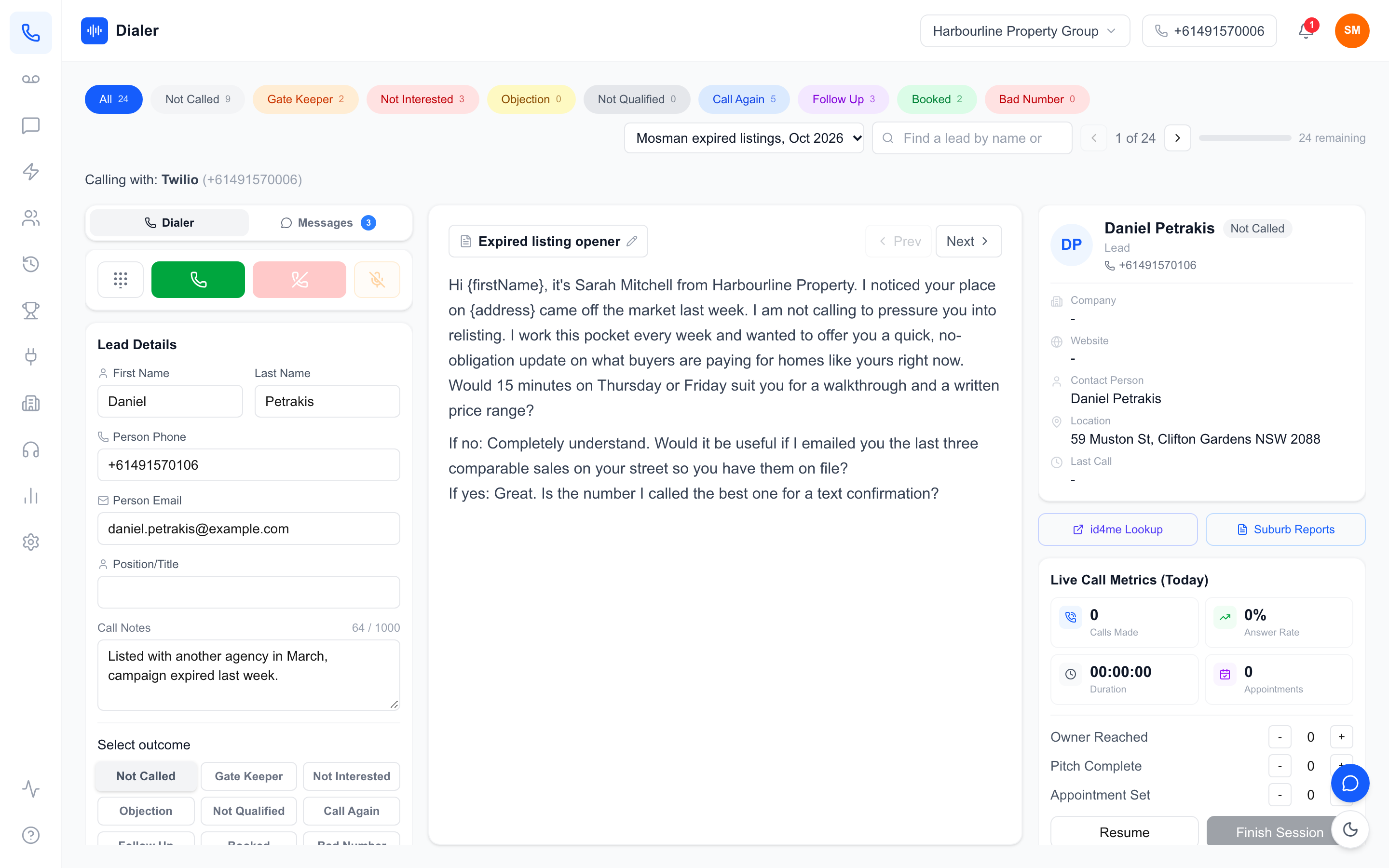
A power dialler loads your list, shows the lead's details on screen and places the call for the rep. When the call ends, the rep tags an outcome such as Booked, Follow Up, Gate Keeper or Not Interested, adds a line of notes if needed, and the dialler moves to the next lead. The rep never touches a keypad, never hunts for the next row, and never forgets to log a no-answer, because logging is part of moving on.
The distinction from other dialler types matters here. A power dialler waits for the rep before it dials, so every answered call reaches someone who is ready for it. If you are weighing it against diallers that ring several numbers at once, our guide to power dialer vs auto dialer differences covers that comparison in detail.
Where the time actually goes
In any power dialler vs manual calling comparison, the talking time on a good call is about the same either way. The difference sits in the gaps: finding the next number, dialling it, logging the result and writing notes. On a list where most dials do not connect, those gaps happen on almost every attempt, which is why the savings show up mostly on no-answers rather than on conversations.
Power dialler vs manual calling: a worked example
The assumptions
There is no universal figure for dials per hour, so rather than quote one, here is a power dialler vs manual calling worked example. Every number below is an assumption chosen to be plausible for a small Australian team calling a cold or lukewarm list. Change any of them to match your own floor.
- One in eight dials reaches a person; the other seven ring out or hit voicemail.
- A no-answer rings for 25 seconds before the rep gives up; an answered call rings for 15 seconds.
- An average conversation lasts three minutes.
- Manual: 20 seconds to find the next lead and number, 10 seconds to dial it, 10 seconds to log a no-answer, 90 seconds to write notes after a conversation.
- Power dialler: about 3 seconds for the next call to start, 5 seconds to tag an outcome, 30 seconds to tidy notes after a conversation (shorter because the outcome is a click and, if recording is on, a summary is attached to the call log afterwards).
Running the numbers
| Step (per eight dials) | Manual calling | Power dialler |
|---|---|---|
| Seven no-answers | 7 x 65 s = 455 s | 7 x 33 s = 231 s |
| One conversation, including ring and notes | 315 s | 233 s |
| Total for eight dials | 770 s | 464 s |
| Dials per hour | about 37 | about 62 |
| Conversations per hour | about 4.7 | about 7.8 |
On these assumptions, a rep on a power dialler makes roughly 25 more dials and three more conversations in an hour. Over a three-hour calling block, that is about 112 dials manually against about 186 with the dialler. The rep is not working harder; they are simply spending less time on the parts of the job that are not talking.
How your own numbers change the result
The gap grows when your connect rate is low, because the dialler saves the most on no-answers. It shrinks when conversations are long, because talk time dominates and is the same either way. A team running 20-minute discovery calls to a short list of warm accounts will see a much smaller difference than a solar or real estate team working through a few hundred cold numbers.
The simplest way to settle power dialler vs manual calling for your team is to time a single calling block. Have one rep work manually for an hour and note dials and conversations, then run the same list type through a dialler during a trial and compare. That gives you a number for your team instead of a number from a blog.
Notes, follow-up, recording and manager visibility
Notes and outcomes
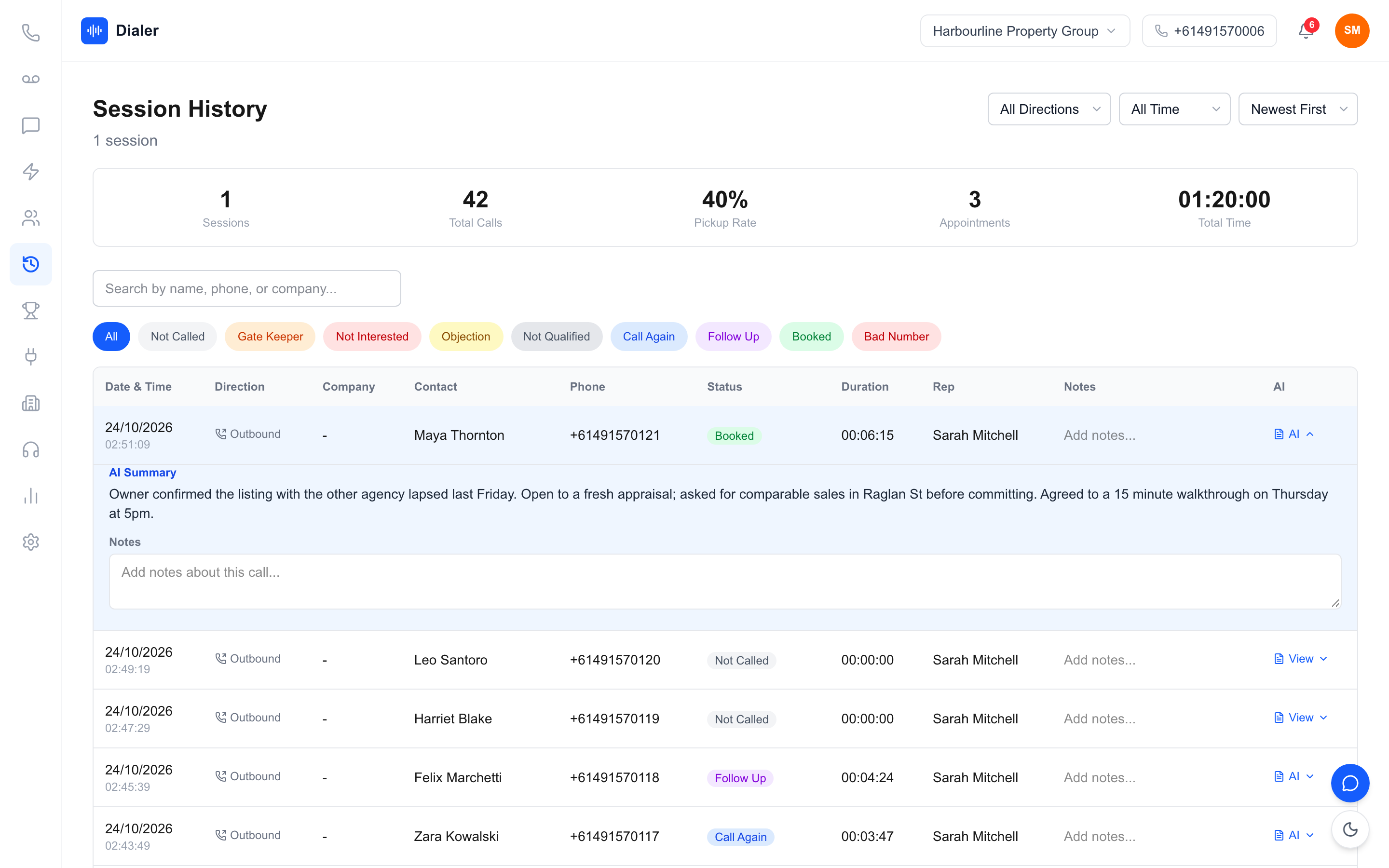
The power dialler vs manual calling gap is just as wide on admin. Manual notes are only as good as the rep's discipline at 4pm on a Thursday. Columns get skipped, "spoke to him, call back" means nothing a week later, and no-answers often go unlogged entirely. A power dialler makes the outcome a required click before the next lead loads, so every attempt has a result against it. Free-text notes still matter for the detail, but the basics are never missing.
Follow-up and callbacks
The real cost of manual calling often shows up days later. A lead asks for a call next Tuesday, and the reminder lives in a notebook. A lead calls back the number they saw, and it rings a rep's personal mobile while they are on another call, or after they have left the business. With a dialler, a Follow Up outcome is logged against the lead where the whole team can see it, and callbacks come in on a business number rather than someone's own phone.
Recording
Most reps dialling from a mobile are not recording calls at all, which means no way to settle a dispute, check what was promised or train a new starter on a real conversation. A dialler with recording keeps the audio against the call log. Recording rules in Australia vary by state and situation, so tell the other party when a call is recorded and get advice on your own obligations before your first recorded call.
Manager visibility
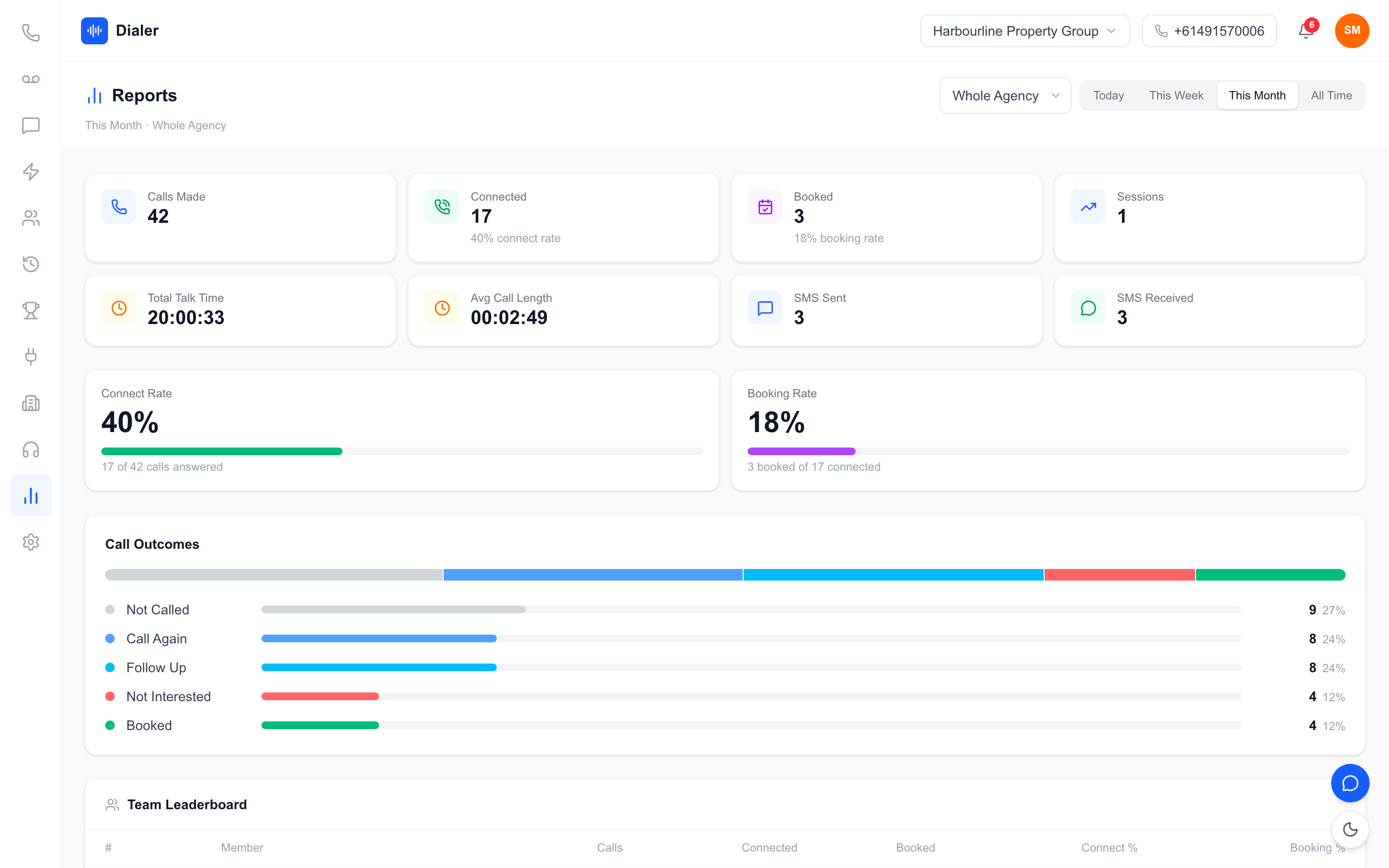
On visibility, power dialler vs manual calling is barely a contest. With manual calling, a manager learns how the day went when reps report it, if they report it. There is no reliable way to see dials, answer rate or appointments set until someone tallies a spreadsheet. A power dialler tracks those numbers as the session runs, which turns "how did we go?" into a report anyone can open.
Veyce: a power dialler built for Australian outbound teams
The dialling flow
Veyce runs in the browser. Turn on Power Dialer in the right panel and the dialler moves to the next lead automatically after each call; turn it off when you want to work a short list by hand. In Power Dialler mode, one lead is rung at a time, so every answered call goes straight to a rep who can see the lead's details and the calling script before they speak. Scripts can be set team-wide or synced from Google Docs, and each rep can keep a personal version.
Numbers, recording and summaries
Your team gets one dedicated Australian number included, and Veyce assigns a rep their own Australian number on request, so their calls and texts go out from it and callbacks ring them first. On the Team, Growth and Agency plans, recording is one account-wide switch in Settings, and it is on by default. Recorded calls made through your Veyce number are transcribed after the call and an AI summary is attached to the call log, which is what makes the 30-second notes figure in the example above realistic.
Lists and compliance basics
Leads import from CSV, XLSX, DOCX, PDF, PNG or JPEG, using OCR and rule-based mapping to fill contact fields. A dialler does not change the rules on who you can call or when. Wash your lists against the Do Not Call Register before you import them, and check the telemarketing industry standard for calling hours and caller identification. Veyce works with your wash: numbers the wash marks as registered are left out of PriceFinder imports, and the Delete DNCR Numbers button clears flagged leads.
Reports and pricing
Live session metrics cover calls made, answer rate, owner reached, pitch complete and appointments set, with a team leaderboard on top. Plans start at $49 a month for Solo (1 seat, 100 minutes) and $179 for Team (4 seats, 400 minutes), with every plan listed on the Veyce pricing page. For a full rundown of features, see the Australian power dialler overview.
Power dialler vs manual calling: which should your team choose?
For most Australian outbound teams working lists of more than a few dozen numbers, the power dialler vs manual calling question comes down to where the rep's time goes. Manual calling spends a large share of every hour on finding, dialling and logging. A power dialler hands that work to software, makes outcomes and notes part of the flow, keeps callbacks on a business number and gives managers numbers without a spreadsheet.
Manual calling still has a place for a handful of high-value accounts where each call needs research first, and a good dialler lets you switch the automation off for those. For everything else, time one manual hour, then run the same list through a trial and compare. Veyce's free trial runs for 3 days from your first call, with 100 calling minutes and no card, which is enough to test the dialling side of the worked example above against your own team. Call recording with AI transcripts and summaries comes on the Team, Growth and Agency plans. Start your free trial and see the difference on your own list.
Frequently asked questions
Is a power dialler faster than manual calling?
Usually, yes, for lists where most dials do not connect. A power dialler removes the time spent finding the next number, dialling it by hand and logging no-answers, so those gaps shrink on almost every attempt. Talk time on a real conversation stays about the same. How big the gain is depends on your connect rate and call length, so time one manual hour and one dialler hour on the same type of list before you decide.
How many dials per hour can a rep make with a power dialler?
There is no single honest figure, because it depends on connect rate, ring time, conversation length and how long reps spend on notes. In the worked example in this guide, with one connect in eight dials and three-minute conversations, a rep makes about 37 dials an hour manually and about 62 with a power dialler. Plug your own assumptions into the same table to estimate what your team would see.
When does manual calling still make sense?
Manual calling suits a short list of high-value accounts where every call needs research first, such as enterprise prospects or referral partners. In those cases the time spent preparing outweighs the time spent dialling, so automation adds little. A good dialler lets you switch the automatic advance off for that list and still keeps the outcome logging, recording and reporting, so you do not lose visibility by calling by hand.
Does a power dialler change the Do Not Call Register rules?
No. The rules on who you may call and when apply however the number is dialled. Wash your lists against the Do Not Call Register before importing them and check the telemarketing industry standard on donotcall.gov.au for calling hours. Veyce works with your wash: numbers the wash marks as registered are left out of PriceFinder imports, and the Delete DNCR Numbers button clears flagged leads from a list.
How can I test a power dialler against manual calling?
Pick one rep and one list type. Have them call manually for an hour and record dials, conversations and appointments. Then run a similar list through a dialler for an hour and compare the same three numbers. Veyce offers a free 3-day trial, counted from your first call, with 100 calling minutes and no card, which is enough for a fair side-by-side test on your own leads before you choose a plan.