If you have typed "dialer australia" into Google, you are probably trying to work out which calling tool your team should use and how to get real value from it once it is running. Most guides stop at a feature list. This one covers the whole life of a dialler in an Australian business: picking the right type for your team size, setting it up in the first week, running daily call blocks, and measuring whether it is paying for itself.
Whether you spell it dialer or dialler, the job is the same: put more conversations in front of your reps in less time, with fewer manual steps between calls. The Australian part matters too. Calling hours, the Do Not Call Register, local caller ID and four time zones all shape how a dialler should work here, and a tool built for the US market will not always handle them the way you need.
Dialer Australia basics: what the tool has to do
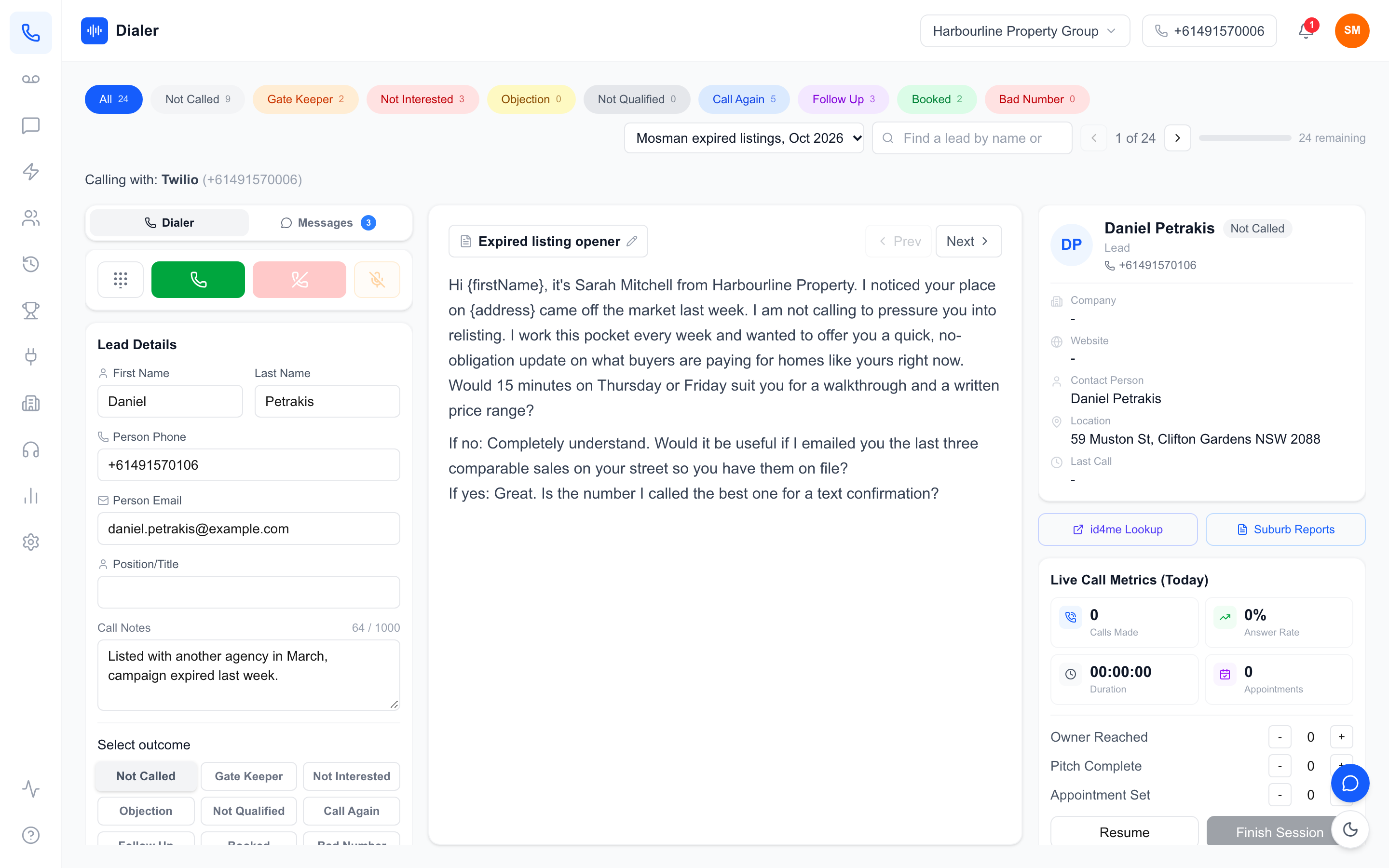
Before comparing products, it helps to be clear on what you are buying. A dialler is the layer between your lead list and your phone line. It decides which number rings next, records what happened, and hands the rep the next lead.
Dialer or dialler: the same tool
"Dialer" is the US spelling and the one most people search for. "Dialler" is the Australian and British spelling, and it is what you will see on most local websites, including ours. Searches for dialer Australia and dialler Australia return the same kinds of products, with the same pricing and the same rules; only the spelling changes. Use whichever your team prefers in documents, but search both when you research tools.
The three jobs every dialler does
Strip away the marketing and a dialler does three things:
- Dial: load a list and move through it without reps typing numbers. In a power dialler, each rep calls the next lead as soon as the last call ends.
- Record: log the outcome of each call, save notes and, where you choose to, record the call itself.
- Follow up: schedule callbacks, send texts and keep the lead history in one place so the next person who calls knows what happened last time.
If a tool does the first job brilliantly but leaves the second and third to spreadsheets, your reps will lose the time they saved.
Where Australian rules shape the tool
Australian telemarketing has rules that affect how you use any dialler. The telemarketing industry standard sets permitted calling hours in the recipient's local time, and businesses making telemarketing calls are expected to wash their lists against the Do Not Call Register before calling. These rules apply to you, not to the software. A good dialler makes them easier to follow, but no tool makes a business compliant on its own, so check the source rules and your own obligations before you start a campaign.
Choosing the right dialer for your team
Teams who search for a dialer Australia-wide usually want one answer, but there is no single best tool. The right one depends on how many people are calling, how warm your leads are and how much admin your team will tolerate. If you want a side-by-side look at specific products, our comparison of six power dialler tools covers that. Here we focus on matching the type of dialler to the team.
Solo reps and owner-operators
A single agent, broker or consultant usually needs speed and simplicity more than management features. Look for a tool you can set up in an afternoon, with an Australian number included, call recording and an easy way to import the list you already have. Per-seat pricing suits you here because you only pay for one seat. Avoid anything that needs a telco account or a hardware handset to get started.
Teams of four to ten
This is where most Australian sales teams sit, and where the choice matters most. You now need shared lead lists so two reps never call the same person, a manager view of who is calling and what is converting, and scripts that stay consistent across the team. Check how minutes are pooled: a shared pool across the team is easier to manage than per-rep allowances that run out unevenly.
Larger floors and agencies
At ten seats and above, the questions shift to admin controls, reporting across teams and whether you can ring several leads at once on high-volume, low-connect lists. Parallel dialling can lift conversation numbers on cold lists, but it changes the experience for the person answering, so test it on a sample before rolling it out.
Questions to ask in any trial
Whatever your size, run a trial on a real list rather than a demo account. Ask: how long from sign-up to first call? Can prospects call or text back the number they saw? Can a manager review a call without listening to the whole recording? What does a month cost at your actual team size? Our guide on what to check before buying a power dialer turns these into nine specific tests.
Setting up and running a dialler day to day
The biggest difference between teams that get value from a dialler and teams that abandon it is the first fortnight. A clean setup and a simple daily rhythm matter more than any single feature.
Week one: numbers, lists and scripts
Start with caller ID. Any dialer Australia-based teams rely on should present a local number, because a local number is easier for a prospect to recognise and call back than a withheld or overseas one. Check that the same number can also receive callbacks and texts. Next, prepare your lists. Wash them against the Do Not Call Register through the official washing process, remove duplicates, and make sure every lead has a name, number and source. Finally, load one script and a short set of call outcomes (no answer, callback, not interested, booked). Keep outcomes few so reps actually use them.
Building daily call blocks
Dialling works best in protected blocks of 60 to 90 minutes with no email or meetings in between. Schedule blocks inside the permitted calling hours for the lead's state, not yours: a 6pm block in Sydney is a 3pm block for leads in Perth during daylight saving. Many teams run a morning block for new leads and a late-afternoon block for callbacks, when people are more likely to be free.
Follow-up that does not fall through the cracks
Most sales are not made on the first call. After every conversation, set the next step inside the dialler: a dated callback, a text with the information you promised, or a note for whoever calls next. A short text straight after a missed call, sent from the same number, often gets a reply when a voicemail would not.
The metrics that tell you it is working
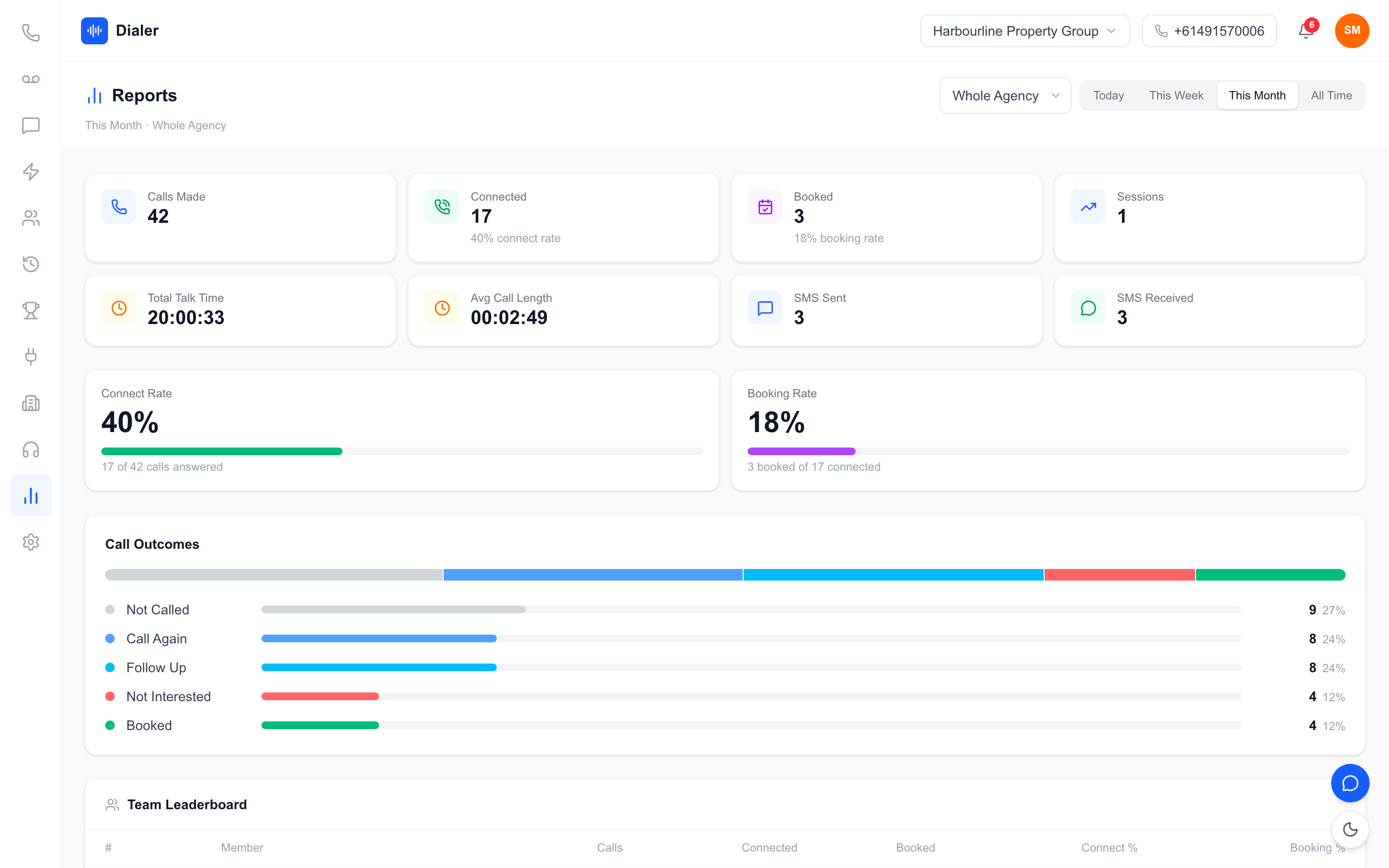
Ignore vanity numbers like total dials. Track conversations per hour, the share of conversations that turn into a booked next step, and how many minutes you use for each booking. Review these weekly, not daily, so one bad session does not drive decisions. If conversations per hour are low, look at list quality and calling times before blaming the reps.
Veyce: a dialler built for Australian sales teams
Veyce is a power dialler built for Australian outbound teams. It is designed around the setup and daily rhythm described above, so a small team can get from sign-up to its first calling session quickly.
Numbers, calling and recording
Your team gets one dedicated Australian number included, and Veyce can assign a rep their own Australian number on request. In Power Dialler mode, each rep calls one lead at a time and moves to the next as soon as a call ends. Calls can be recorded, and AI transcription and summaries are produced after each recorded call, so a manager can read what happened in seconds instead of replaying the audio.
Lists, scripts and follow-up
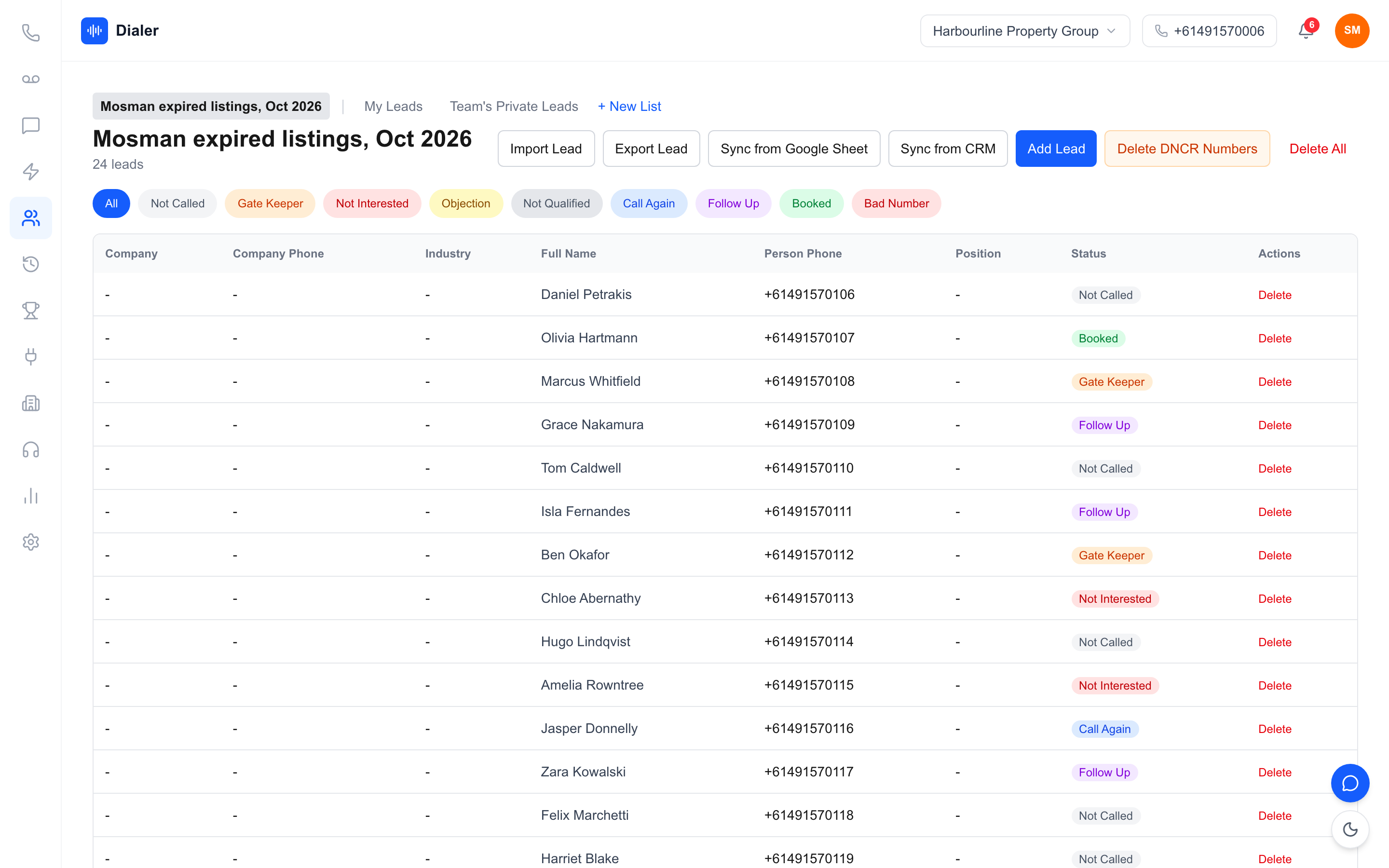
Veyce imports leads from spreadsheets, PDFs and photos using OCR and rule-based mapping, which helps when your list arrives in an awkward format. Veyce works with your own DNCR wash: numbers the wash marks as registered are left out of PriceFinder imports, and the Delete DNCR Numbers button clears flagged leads. Calling scripts sync from Google Docs, leads can be imported from Google Sheets, and an SMS inbox lets reps text from the team number. Real estate teams can also use suburb reports for prospecting.
Metrics, plans and the Parallel Dialer
Live session metrics and leaderboards show managers who is calling and what is converting. Plans start at $49 a month for Solo (1 seat, 100 minutes), with Team at $179 (4 seats, 400 minutes), Growth at $449 (10 seats, 1,000 minutes) and Agency at $1,099 (25 seats, 2,500 minutes); extra seats are $29 each. Full details are on the Veyce pricing page. On Growth and Agency, the Parallel Dialer add-on (+$99 a seat) rings up to 5 or up to 10 leads at once respectively, and runs only on weekdays 9am–8pm and Saturdays 9am–5pm, in the lead's local time, with no calls on Sundays or national public holidays. You can read more about the product on our power dialler for Australian teams page.
Conclusion: pick for your team, then build the habit
Choosing a dialer Australia-wide comes down to three things: match the type of tool to your team size, set it up cleanly with a local number and washed lists, and protect daily call blocks with a simple follow-up routine. Measure conversations and bookings, not dials, and give any new tool at least two weeks of real use before judging it.
The fastest way to know whether a dialler fits is to run it on your own list. Veyce's free trial runs for 3 days from your first call, with 100 calling minutes and no card required, so you can load a real list, make real calls and see the session metrics before you spend anything.
Frequently asked questions
What is the best dialer in Australia?
There is no single best dialer for every Australian team. A solo agent needs a quick setup, an Australian number and call recording, while a team of ten needs shared lists, manager reporting and pooled minutes. Shortlist two or three tools that include local numbers and publish their prices, then run each one on a real list for a week. The tool your reps actually keep using is the right one, whatever the feature list says.
Is it dialer or dialler in Australia?
Both spellings refer to the same software. Dialler is the Australian and British spelling, and dialer is the US spelling that most people type into search engines. Product pages, pricing and the rules that apply to calling are the same whichever spelling a vendor uses. When you research tools, search both spellings, because Australian vendors often use dialler while overseas vendors usually use dialer in their marketing and documentation.
Do I need to wash my lists before using a dialler?
If you are making telemarketing calls, you are generally expected to check your lists against the Do Not Call Register before calling, and the register's official washing process explains how. The obligation sits with your business, not with your software. A dialler can make the result easier to manage, for example by leaving registered numbers out of an import, but you should confirm your own obligations on the Do Not Call Register website before starting a campaign.
How many minutes does a small sales team need each month?
Work it out from a normal calling day, not from dials. Take a rep's typical number of conversations, multiply by the average call length, and add a little for short attempts that do not connect. Multiply that by working days and by the number of reps, then compare the total with the plan's included minute pool. Track real usage for the first month and adjust, because list quality changes the numbers a lot.
Can I try a dialler before paying for it?
Most dialler vendors offer some form of trial, and you should insist on one that lets you call real leads rather than a sandbox. Veyce offers a free trial of 3 days from your first call, with 100 calling minutes and no card required. Each trial call ends after 7 minutes. Use the trial to test the things that matter for your team: how fast you can import your list, whether prospects can call and text back, and whether managers can see results without chasing reps.