Power dialler software is easy to describe in one line: it calls the next lead for you as soon as your last call ends. What is less obvious is what actually happens inside a calling session, step by step, and which of those steps decide whether a rep has a productive hour or a frustrating one. Feature lists rarely explain it, and that makes it hard to set the software up well.
This guide opens the bonnet. It walks through a single call from the queue to the wrap-up, explains what happens around each call (caller ID, recording, notes and summaries), and then covers the settings and habits that most affect a session. It is written for Australian reps and managers who already use power dialler software, or are about to, and want to run it properly rather than just press start.
How power dialler software works, call by call
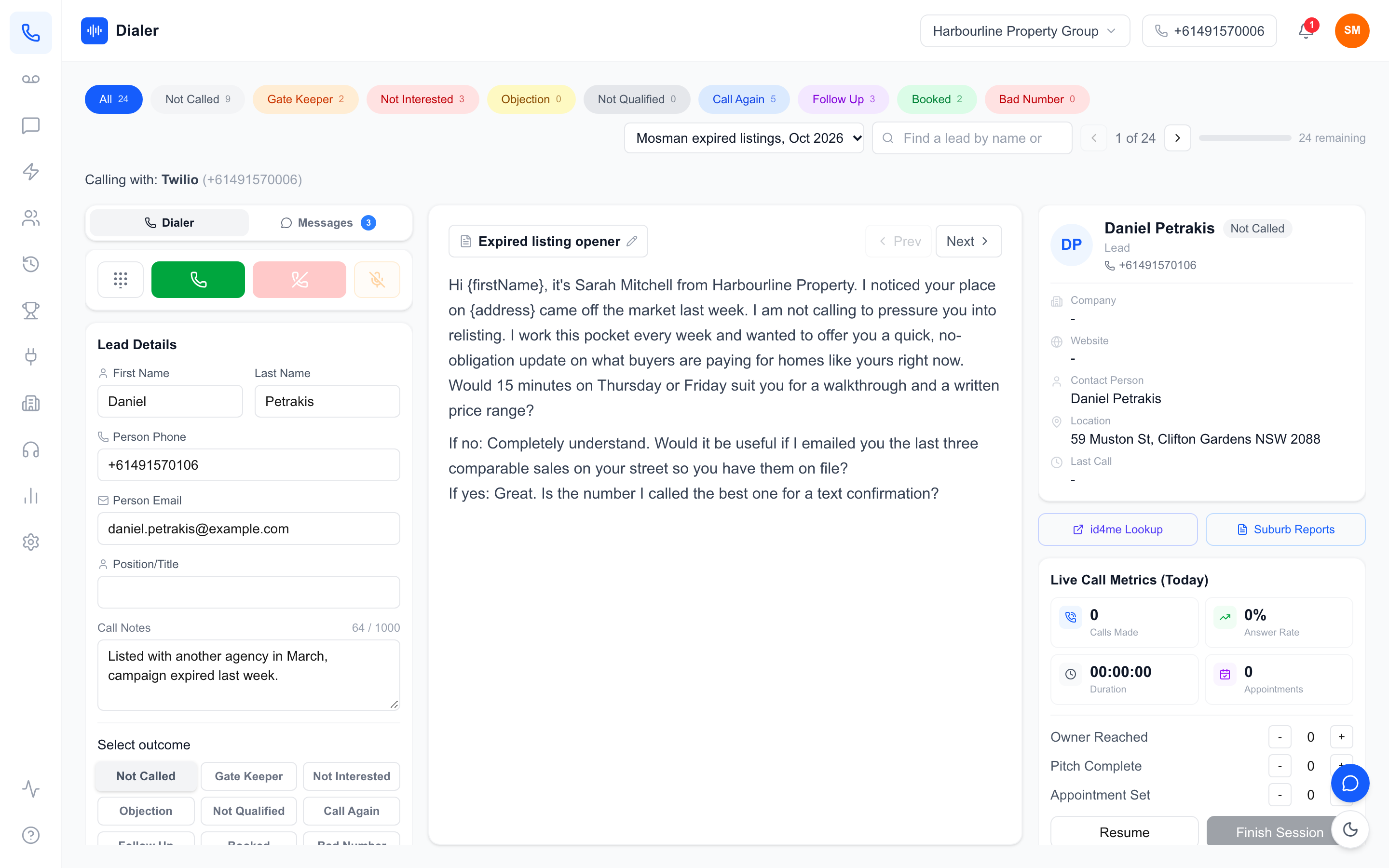
Every power dialler, whatever the brand, runs the same loop: pick a lead, dial it, connect the rep if someone answers, capture what happened, and pick the next lead. Knowing the loop makes every setting easier to understand.
The queue
A session starts with a queue: the leads the software will work through, in order. The queue usually comes from a list or a filter, such as "new leads from this week" or "callbacks due today". Order matters more than most teams realise. If the hottest leads sit at the bottom of a 300-lead queue, the session may end before anyone reaches them. Good practice is to sort by priority first, such as callbacks due, then new enquiries, then older attempts.
The dial and the connect
When the rep is ready, the software dials the next number from the queue and plays the ringing to the rep. If the prospect answers, the rep is already on the line and the conversation starts straight away; there is no "hello, hello?" pause while a system connects someone. If nobody answers, the rep can end the attempt and move on. This is the key difference from predictive dialling, which dials several numbers per agent and connects answered calls to whoever is free.
The wrap-up
After the call ends, the rep spends a short moment on wrap-up: choose an outcome, add a note, set a callback if one was promised. Wrap-up is where the value of the call is either captured or lost. A dialler that makes wrap-up quick, with a handful of outcome buttons and a notes box, keeps the rep moving without skipping it.
Pacing: one line per rep versus several
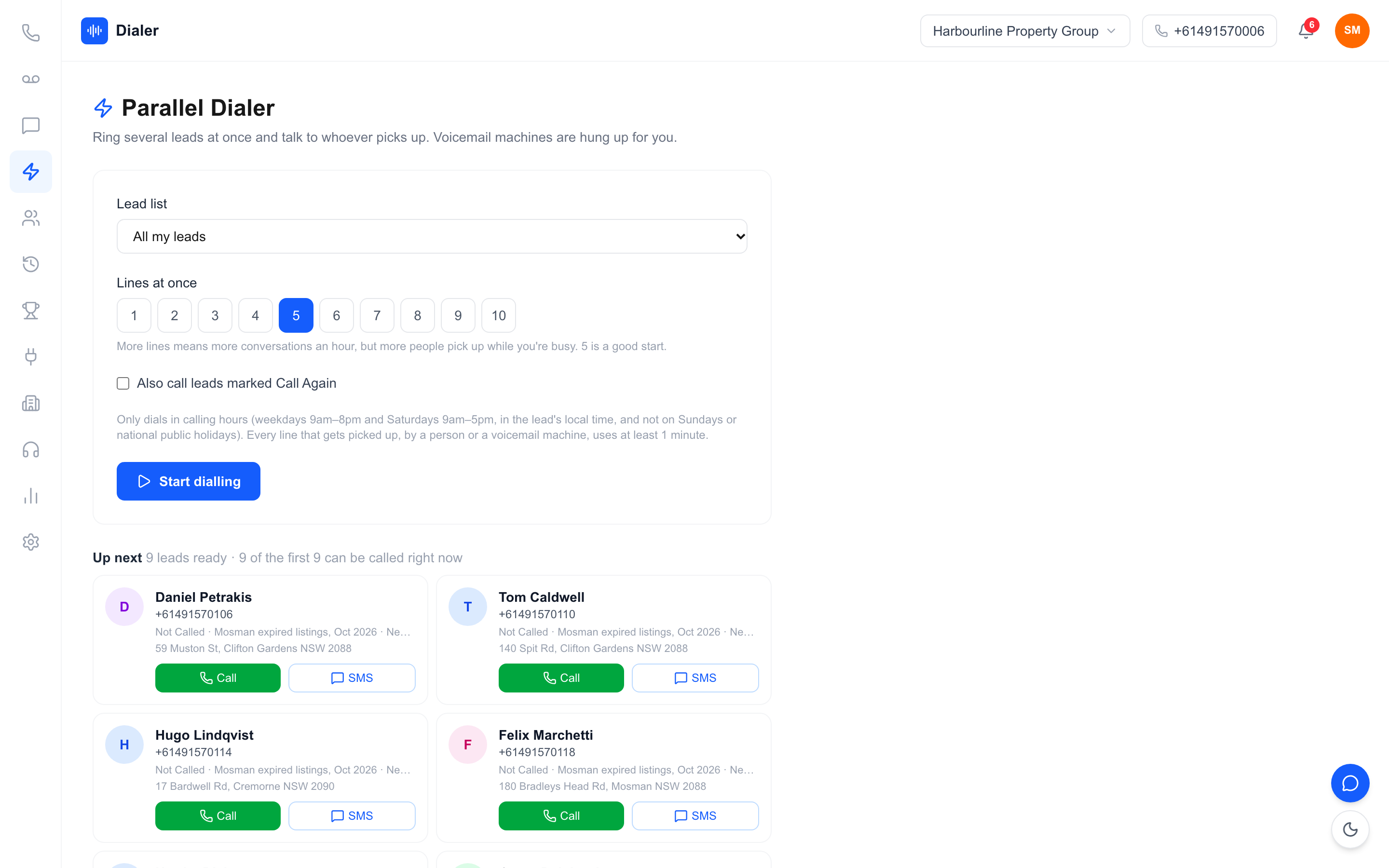
Classic power dialling runs one line per rep, with the next dial starting only when the rep is ready. Some products add a parallel mode that rings several leads at once and connects the first person who answers, which can lift conversations on large, cold lists with low answer rates. It also means some people answer to find the line already taken, so test it on a sample before using it on warm leads.
What happens around each call
The loop above is the engine. The parts around it decide whether prospects pick up, whether calls are reviewable and whether follow-up happens.
Caller ID and callbacks
The number a prospect sees matters. An Australian number is more likely to be answered than a withheld or overseas one, and it has to work in both directions: when the prospect calls back or replies by text, it should reach your team, not a dead end. Keep the same number across attempts so the second and third calls look familiar rather than random.
Recording and consent
Many power dialler software products can record calls. Recording helps with training, disputes and accurate notes, but it comes with obligations. Recording and privacy laws vary between Australian states and depend on how you use the audio, so check the rules that apply to your business and tell people the call is recorded where you need to. The software records; whether and how you do it is your decision.
Notes, outcomes and summaries
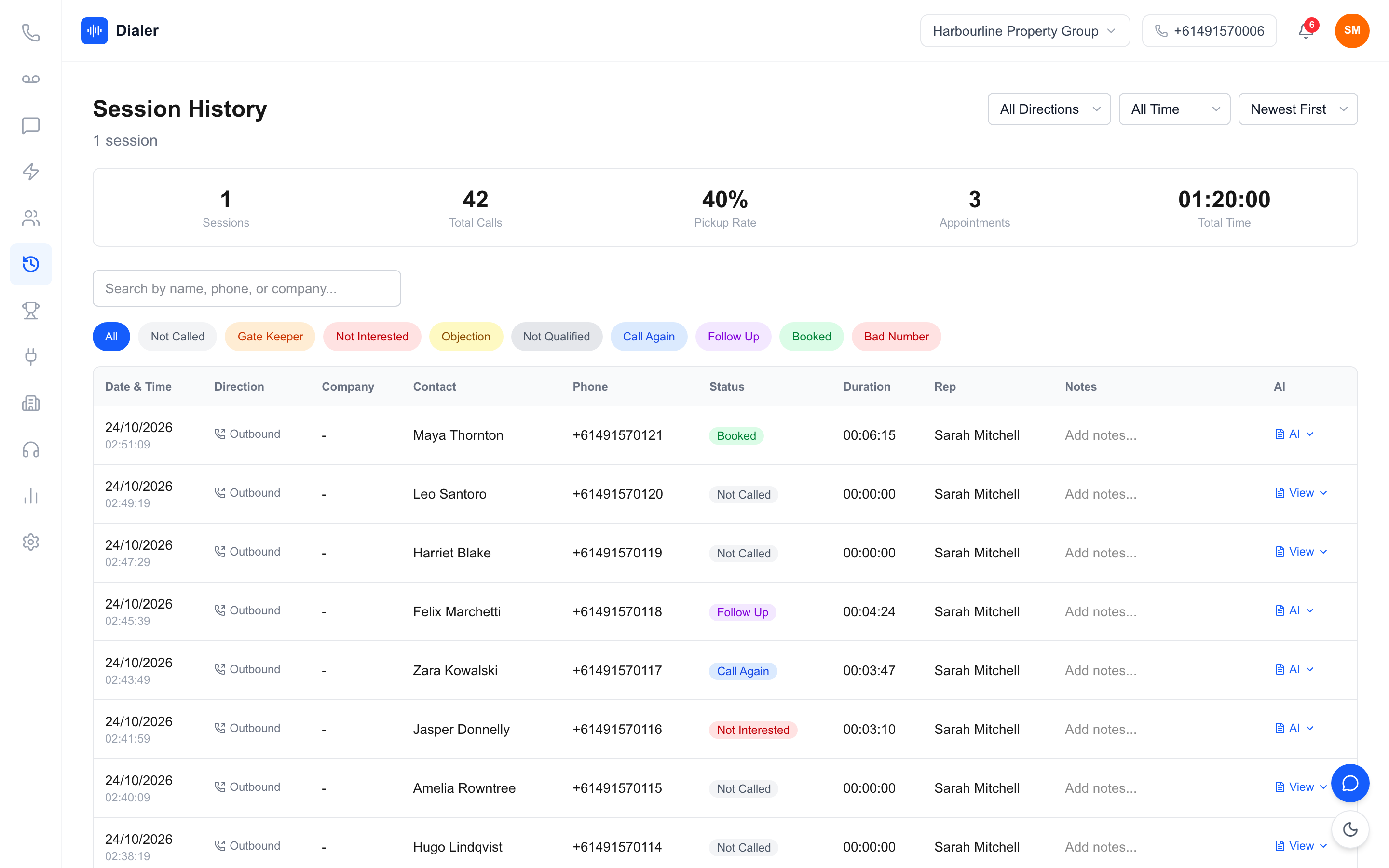
Notes typed during the call are useful but uneven: one rep writes a paragraph, another writes "int." Structured outcomes make reports reliable. On top of that, some tools now produce a transcript and a written summary after a recorded call, so whoever calls the lead next can read the last conversation in a few seconds. Start a free 7-day Veyce trial with 50 calling minutes included.
Getting a session right: settings and habits that matter
Most of the difference between a good and a bad hour on power dialler software comes from a few settings and habits, not from the software itself.
List quality and order
Clean the list before it becomes a queue: remove duplicates, fix obviously broken numbers and make sure each lead has a name and a source. If you make telemarketing calls, wash it against the Do Not Call Register through the official washing process first. Then order it so the leads most likely to convert come up early in the session, while the rep is fresh.
Outcome codes
Keep outcomes to six or fewer, with names everyone reads the same way. Booked, follow up, call again, not interested and wrong number cover most sales teams. Too many outcomes and reps pick whichever is nearest the mouse; too few and you cannot tell a lost deal from an unanswered phone.
Calling hours and time zones
Set sessions in the lead's local time, not the rep's. A Brisbane team calling Perth in the morning will ring people before they are at work. Permitted telemarketing calling hours are set out in the telemarketing industry standard; check them and your own obligations before you schedule blocks, especially for parallel modes.
Session length and breaks
Power dialling is intense because the dead time between calls disappears. Blocks of 60 to 90 minutes with a short break between them usually beat a three-hour marathon, where the last hour is tired and rushed. End each block by clearing callbacks and wrap-up notes so nothing carries over unfinished.
Veyce: power dialler software for Australian teams
Veyce is power dialler software built for Australian sales teams, and it follows the loop described above. The Veyce power dialler for Australian teams page shows the product in more detail.
The calling loop in Veyce
In Power Dialler mode, each rep calls one lead at a time and the next lead comes up as soon as a call ends. Veyce runs in the browser, so there is no softphone to install and no telco account or hardware to buy. Your team gets one dedicated Australian number included, and Veyce can assign a rep their own Australian number on request. Reps can text from the team number through the SMS inbox.
Recording, summaries and outcomes
Calls can be recorded, and AI transcription and summaries are produced after each recorded call, not during it. Session history shows each call's outcome, and live session metrics and leaderboards show how the block is going. Calling scripts sync from Google Docs into the dialler.
Lists and the Parallel Dialer
Leads come in from spreadsheets, PDFs and photos using OCR and rule-based mapping, or are imported from Google Sheets. Veyce works with your own DNCR wash: numbers the wash marks as registered are left out of PriceFinder imports, and the Delete DNCR Numbers button clears flagged leads. On Growth and Agency, the Parallel Dialer add-on (+$99 a seat) rings up to 5 or up to 10 leads at once respectively, on weekdays 9am–8pm and Saturdays 9am–5pm in the lead's local time, with no calls on Sundays or national public holidays.
Conclusion: understand the loop, then tune it
The short version
Power dialler software runs a simple loop: queue, dial, connect, wrap up, next. Most of the gains come from what you feed it and how you run it: a clean, well-ordered list, a familiar Australian number, quick wrap-up with clear outcomes, sessions planned in the lead's local time, and blocks short enough to stay sharp. If you want to see how power dialling compares with other dialler types, read our explainer on power dialers versus auto dialers, and check Veyce's plans when you are ready to price a team.
See the loop for yourself
Veyce offers a free 3-day trial, counted from your first call, with 100 calling minutes and no card required. Import a list, run one short session and watch the queue, the wrap-up and the session history work together.
Frequently asked questions
How does power dialler software work?
Power dialler software takes a queue of leads and dials the next one as soon as the rep finishes the previous call. If someone answers, the rep is already on the line. If nobody answers, the rep moves on. After each call the rep picks an outcome, adds notes and sets any callback, then the next lead dials. The software removes typing and waiting, while the rep stays in control of pace.
What is wrap-up time in a power dialler?
Wrap-up is the short pause after a call where the rep records what happened: an outcome such as booked or call again, a note, and a callback date if one was promised. It is where the value of a conversation is captured for the next person who calls the lead. Keep it quick with a short list of outcomes, but do not skip it, or reports and follow-up both suffer.
Is power dialler software the same as a predictive dialler?
No. Power dialler software dials one lead per rep, or a few at once in a parallel mode, and the rep is on the line when someone answers. A predictive dialler dials many numbers per agent and connects answered calls to whoever is free, which suits large call centres. Power dialling gives fewer dropped or delayed connections and suits sales teams who want control over each conversation.
Does power dialler software record calls?
Many products can, and recording is useful for training, accurate notes and resolving disputes. Recording and privacy rules vary between Australian states and depend on how the audio is used, so check what applies to your business and tell people a call is recorded where required. In Veyce, calls can be recorded on the Team, Growth and Agency plans, and AI transcription and summaries are produced after each recorded call rather than during it.
How long should a power dialling session be?
Most teams do best with focused blocks of 60 to 90 minutes and a short break between them. Power dialling removes the dead time between calls, so it is more tiring than manual calling, and the last hour of a long marathon tends to be rushed. Finish each block by clearing callbacks and notes, and schedule blocks in the lead's local time rather than the rep's.