A fully managed sales dialler should take the phone plumbing off your plate, but it still needs an hour or two of setup from your side before the first good session. The vendor supplies the Australian number, the minutes and the recording; your team still decides who to call, what to say, how outcomes are logged and who checks the results. Skip those decisions and even the best dialler produces a messy first week.
This checklist walks through that setup in the order it actually happens, from the day you sign up to the end of your first week of calling. It is written for team leaders and owners in real estate, solar, finance and other Australian outbound teams, and it works for any managed dialler. If you want the background on what "managed" means first, our explainer on how a managed power dialler works covers it.
What a fully managed sales dialler covers, and what it does not
The parts the vendor runs
On a fully managed plan the vendor provides the calling number, the minutes and the connection, plus call recording and storage. There is no telco account to open, no SIP trunk to configure and no hardware to buy: reps call from a browser with a headset. That is the whole point of managed, and it is what makes a same-day start realistic.
The parts your team still owns
Managed describes the technology, not the people. Your own reps make every call; a fully managed sales dialler is not an outsourced calling service or a call centre that rings leads for you. Your business still owns the list, the wash against the Do Not Call Register, the script, the outcome labels and the follow-up. The checklist below is mostly about those parts.
Three questions before you sign up
Ask each vendor: what is included in the monthly price (seats, minutes, numbers, recording), what happens when the minutes run out, and whether you can try it with your own list before paying. A vendor that answers all three in writing on a public pricing page is easier to plan around.
Day one: the account setup checklist
Admin, seats and roles
Start with one admin account, then invite reps once the basics below are in place. Decide who can import lists, who can see every rep's calls and who only sees their own. A clear admin from the start avoids the familiar mess of five people uploading five copies of the same list.
Your Australian number and callbacks
Check which number your leads will see. A local Australian number that rings back to your team gets more callbacks answered than a hidden or overseas caller ID. Decide who answers callbacks during the day and what happens after hours, then ring the number yourself from a mobile to confirm it works end to end.
Recording and how you tell leads
Decide whether calls on the number are recorded. Recording is what makes summaries, reviews and dispute checks possible, but rules on recording calls and telling the other party differ between states. Agree the wording reps use at the start of a call with whoever advises your business, and put it at the top of the script.
Scripts and objection notes
Load the opening, two or three qualifying questions and short answers to the objections your team hears most. Keep it to one screen. A script reps can glance at mid-call beats a long document nobody opens.
Getting lists, outcomes and people ready
Wash the list before it goes in
Wash every list against the Do Not Call Register before importing it, unless you hold consent for each number. The Do Not Call Register washing overview explains how businesses do this and how long a wash result stays valid. A dialler speeds up calling, so it also speeds up the cost of calling the wrong numbers.
Import and map the fields
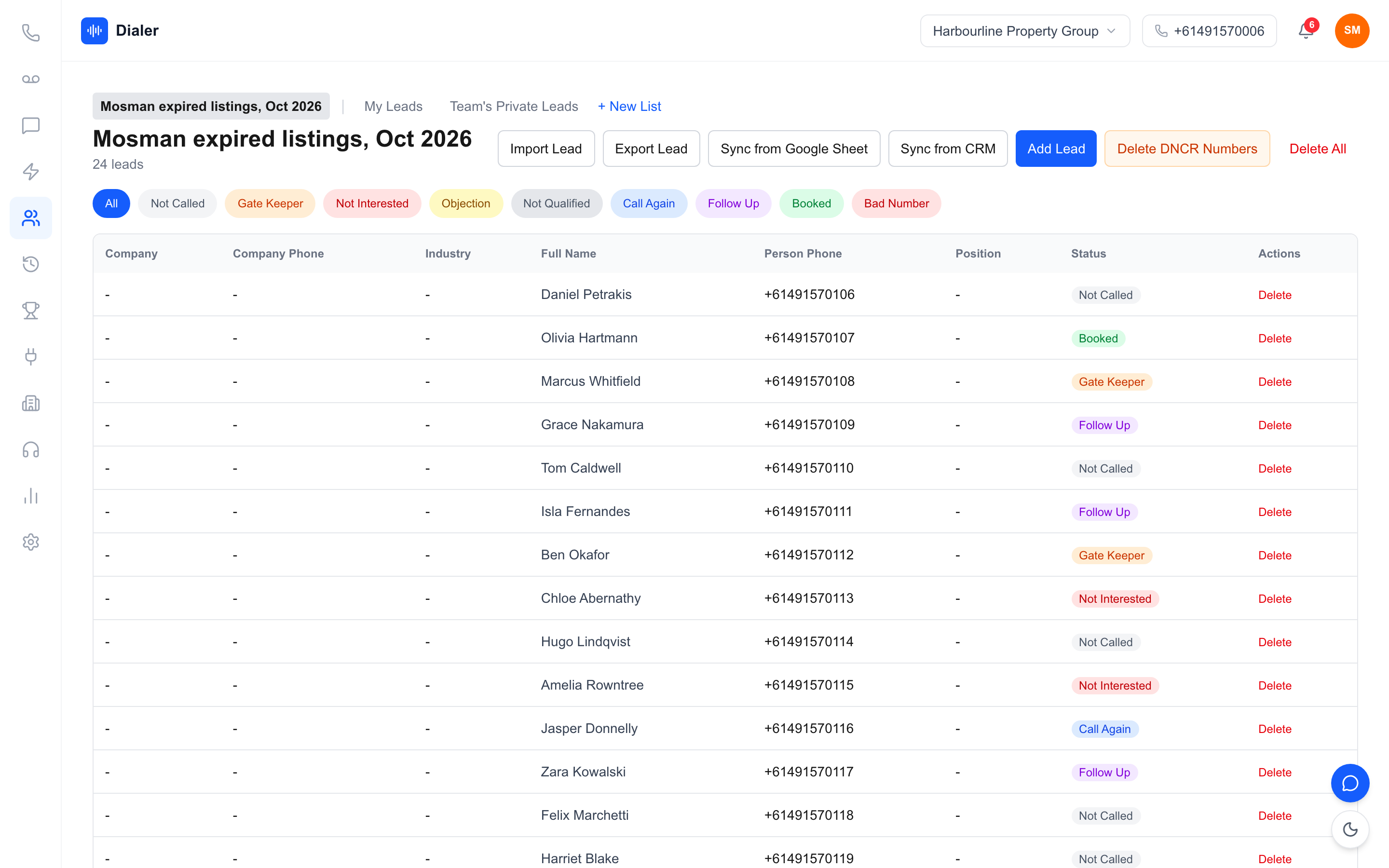
Import the washed list and check the column mapping: name, phone, suburb, source and any notes your reps need on screen. Open five lead cards at random and confirm the numbers, names and notes landed in the right fields before anyone dials.
Outcomes and callback rules
Agree a short set of outcomes, for example no answer, not interested, call again, follow up and appointment booked. Fewer, clearer outcomes make reports meaningful. Decide how many attempts a lead gets and how far apart, so callbacks do not depend on each rep's memory.
A short training session
Run a 30-minute walkthrough with the reps: start a session, log an outcome, add a note, book a callback, end the session. Then let each rep make three practice calls to a colleague's mobile.
The first week: checks that show setup worked
One rep, one list, one afternoon
Start with a single experienced rep on a single washed list. Watch for anything that slows them down: missing fields, confusing outcomes, a script that is too long. Fix those before the whole team starts.
Review recordings and summaries
At the end of day one, open a handful of recorded calls and their summaries. Check the opening wording, how objections were handled and whether the next step is clear. This is where most setup issues show up.
Watch the session numbers
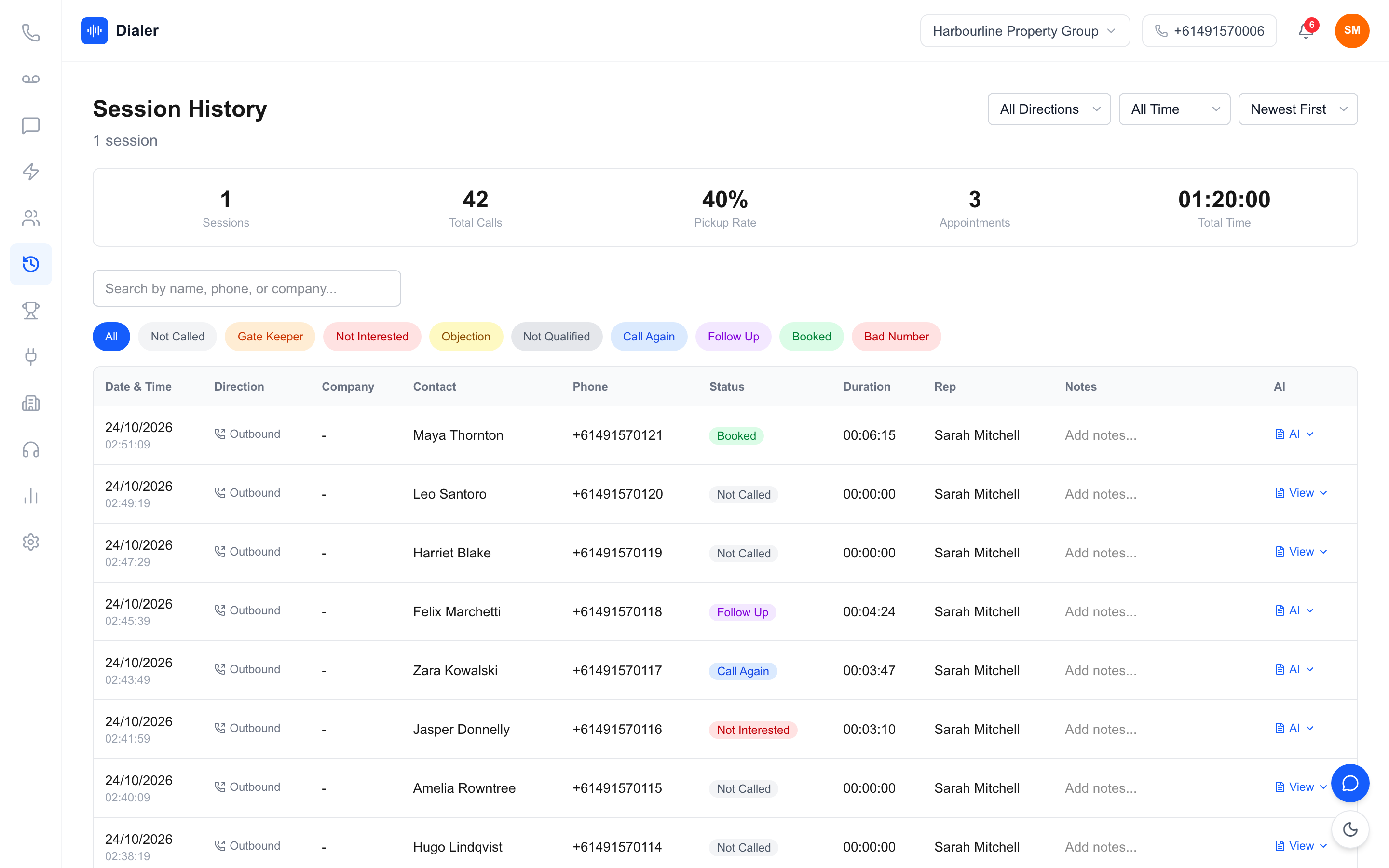
Track calls made, conversations, callbacks set and appointments for each session. You are not judging reps yet; you are checking that outcomes are being logged consistently so later numbers can be trusted.
Roll out and write it down
Once the first rep's sessions run cleanly, invite the rest of the team and write the setup into a one-page guide: wash, import, outcomes, script, callbacks. New starters then follow the same steps.
Veyce: a fully managed sales dialler for Australian teams
What comes included
Veyce is a fully managed sales dialler for Australian outbound teams. Your team gets one dedicated Australian number included, and Veyce assigns a rep their own Australian number on request. Minutes are included on every plan as a shared pool. Call recording, with an AI transcript and summary after each recorded call, comes on Team ($179 a month), Growth ($449) and Agency ($1,099); Solo does not include call recording. You can see what is in the Veyce power dialler for Australian teams.
Lists, scripts and sessions
Leads come in from spreadsheets, PDFs and photos using OCR and rule-based mapping, or from Google Sheets on demand. Veyce works with your wash: numbers the wash marks as registered are left out of PriceFinder imports, and the Delete DNCR Numbers button clears flagged leads. Scripts can load from Google Docs, and in Power Dialler mode, Veyce rings one lead at a time for each rep and moves on when the rep logs an outcome. Live session metrics and a leaderboard show how the day is going.
Plans and prices
Solo is $49 a month for 1 seat and 100 minutes, Team is $179 for 4 seats and 400 minutes, Growth is $449 for 10 seats and 1,000 minutes, and Agency is $1,099 for 25 seats and 2,500 minutes. Extra seats are $29 each and minute top-ups start at 100 minutes for $30. Every price is on the Veyce pricing page.
Conclusion: set it up once, then let reps call
The short version
A fully managed sales dialler removes the telco work, but the setup decisions are still yours: a washed list, clean fields, clear outcomes, a short script and a first week of checks. Get those right once and every later session runs on rails.
Your next step
Work through this checklist with one rep and one list. Start a Veyce free trial: 3 days from your first call and 100 calling minutes, no card, enough to test the dialler, lead import, scripts and session flow on your own leads. Call recording with AI transcripts and summaries comes on the Team, Growth and Agency plans.
Frequently asked questions
What is a fully managed sales dialler?
A fully managed sales dialler is calling software that comes with the phone side included: the Australian number, calling minutes, call recording and the connection are all part of one plan. Your team needs no telco account, SIP trunk or desk phones, only a browser and a headset. Managed refers to the technology. Your own reps still make every call, so it is a tool your team uses rather than an outsourced calling or call centre service.
How long does it take to set up a managed sales dialler?
The technical part is short because the number and minutes come with the account. Most of the time goes into decisions only your team can make: washing and importing the first list, agreeing outcome labels, writing a one-screen script and deciding who answers callbacks. Plan an afternoon for setup and a first session with one rep, then a week of checks on recordings, summaries and session numbers before rolling out to everyone.
Does a managed dialler wash my list against the Do Not Call Register?
Not usually, and Veyce does not. Your business remains responsible for washing lists against the Do Not Call Register unless you hold consent for each number. Veyce works with your wash: numbers the wash marks as registered are left out of PriceFinder imports, and the Delete DNCR Numbers button clears flagged leads. Build the wash into your import routine so every list is checked before it reaches the dialler.
Do reps need their own phone numbers on a managed dialler?
Not to get started. With Veyce, your team gets one dedicated Australian number included, so every rep can call from day one. If a rep needs their own line, Veyce assigns them their own Australian number on request; that rep's calls and texts then go out from it and callbacks ring them first, then the team. Decide early who answers callbacks on the shared number so none are missed.
What should we check in the first week?
Check four things. First, that imported fields are landing correctly on the lead cards. Second, that recorded calls open with the agreed wording and that summaries show a clear next step. Third, that reps use outcome labels consistently, so session numbers mean something. Fourth, that callbacks are being booked and answered. Fix what you find with one rep before inviting the whole team, then write the routine into a one-page guide.