Choosing Australian real estate calling software is less about the dial button and more about how your agency actually prospects: who calls, from which number, off which data, and how a principal sees what happened. Most tools can place a call. Far fewer fit an office where a principal, two or three listing agents, a BDM and a PA all share one database and one reputation in the same few suburbs.
This checklist is written for principals and sales managers who are comparing options. It walks through the questions worth asking before you sign anything, what to test in a trial, and how to cost a real agency rather than a single seat. If you want the case for why agents should use a power dialler at all, read our earlier guide on the power dialler for real estate agents in Australia first. This piece assumes you are already convinced and now need to pick well.
What Australian real estate calling software has to handle
Real estate calling in Australia has a shape that generic sales software often ignores, and good Australian real estate calling software is built around it. The checks below come straight from how agencies prospect.
Australian numbers that locals will pick up
Homeowners in your patch decide in a second whether to answer. A mobile or local Australian number that stays the same across every call and text is the minimum. Ask any vendor three questions: is an Australian number included, can a rep have their own number, and do callbacks reach the person the homeowner spoke to? Rotating pools of unfamiliar numbers save a vendor money and cost you answer rates.
Property data that arrives in odd formats
Agency data rarely starts as a clean CSV. It comes as a PriceFinder export, a spreadsheet from an old CRM, a PDF of open-home sign-ins or a photo of a paper list from a letterbox drop. Real estate calling software should take those files without you retyping names and numbers. Watch for how it handles addresses split across several columns and names split into surname and initials, because that is how a lot of property data is shaped.
Shared lists across a whole office
A circle-prospecting list around a new listing is an office asset, not one agent's spreadsheet. You want lists that everyone in the agency can work, with outcomes visible to everyone, so two agents never call the same homeowner on the same afternoon. Lists per suburb or per campaign keep that tidy.
Visibility for the principal
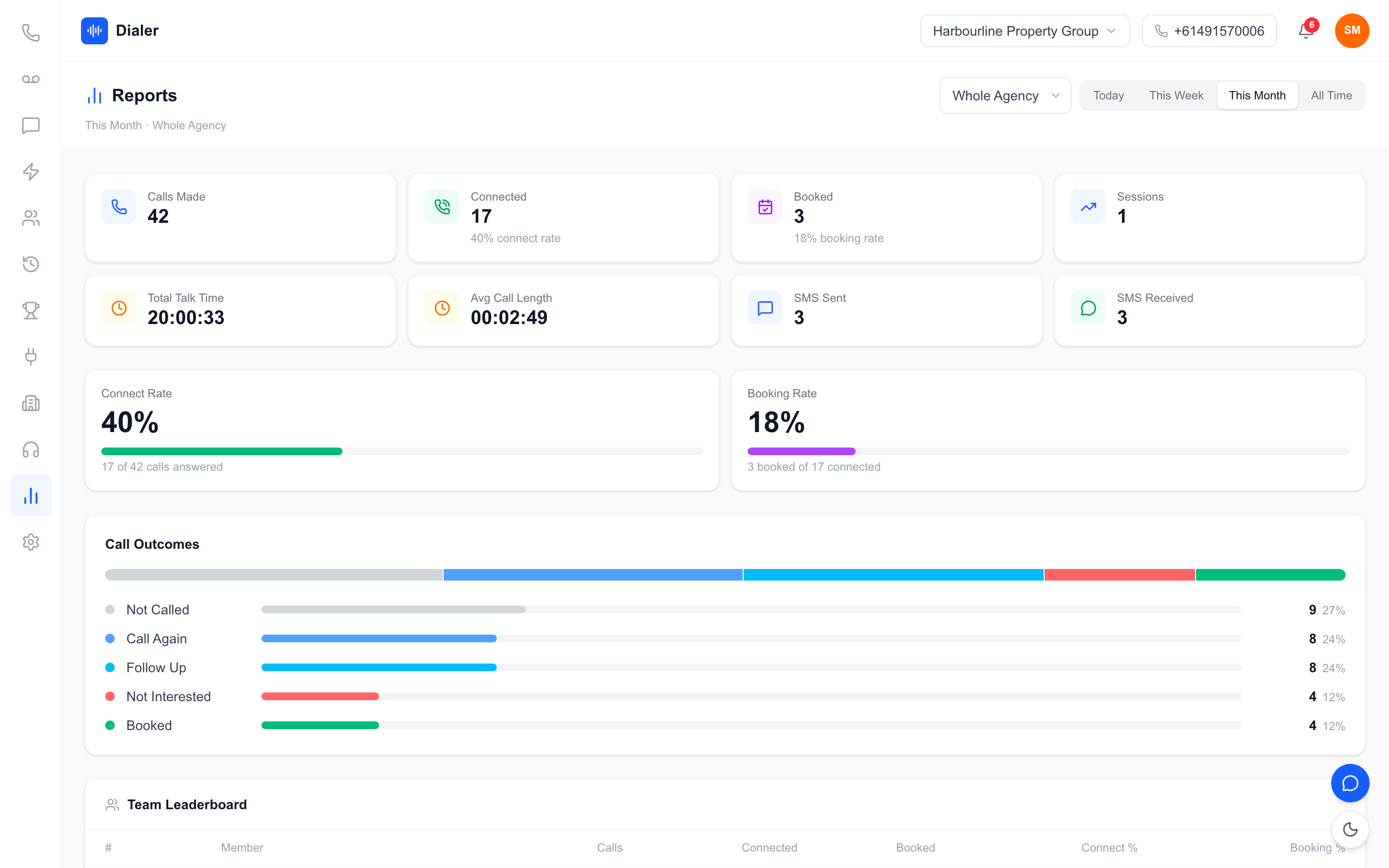
Principals need to see activity without sitting on the floor. Calls made, answer rate, appraisals booked and the content of key conversations should be visible the same day. Without that, prospecting becomes a weekly argument about who did what.
The buyer's checklist: questions to ask every vendor
Take this list into every demo of Australian real estate calling software. A vendor who cannot answer clearly is telling you something.
Dialling mode and calling hours
Ask whether the tool is a power dialler (it dials the next lead when the agent is ready) or a predictive dialler (it rings several numbers and connects whoever answers). For residential prospecting, the pause and connection delays of predictive dialling tend to annoy homeowners. Also ask how the tool treats calling hours. Telemarketing calls in Australia are limited to set hours, which the register publishes in its industry standards summary, and any tool that rings several leads at once should respect those hours in the lead's local time.
How it works with your Do Not Call Register wash
Most residential numbers you cold call need to be washed against the Do Not Call Register first, and a wash is only relied on for 30 days according to the register's industry FAQs. Calling software does not replace the wash. What it should do is make it easy to keep flagged numbers out of your lists after you wash. Ask exactly what happens to a number your wash marks as registered when you import the file.
Recording, transcripts and summaries
Recording is useful for training and for settling "what did I actually say" questions. Summaries matter more for a busy principal, because nobody listens back to 60 calls. Ask whether summaries are generated after the call for recorded calls, and how quickly they appear. Be wary of any vendor that promises real-time transcription as standard, and ask to see a real summary from a recorded call.
Texting from the same number
The best follow-up after a warm call is a short text with the sales data you promised. Check that texts go out from the same number the homeowner just saw, and that replies land in an inbox the agent can see without hunting.
Testing real estate calling software in a trial
A trial of Australian real estate calling software only tells you something if you run it like a real week. Here is how to structure one.
Use a real, washed list
Pick one suburb you actually prospect, wash the list, and import it on day one. Fake data hides every import problem. A real PriceFinder export will show you whether names, addresses and flagged numbers come through the way you expect.
Run two proper sessions
Book two prospecting blocks of an hour each, ideally with two different agents. Measure the basics: calls made, conversations, appraisals or follow-ups booked, and how long it took to log each outcome. Compare that with your agents' normal week, using your own numbers rather than any vendor's claims.
Review like a principal
After each session, open the summaries and the session report as the principal would. Can you tell, in ten minutes, which conversations need a follow-up and where an agent lost the homeowner? If the answer is no, the visibility features are not doing their job.
Check what happens on day eight
Ask what you lose if you do not continue. Can you export your lists and outcomes? Do the call recordings disappear? A tool that holds your prospecting history hostage is a risk for an agency, because that history is part of your rent roll and your listing pipeline.
Costing a real agency, not a single seat
Headline prices are usually quoted per seat or for a single user. Agencies need to price the whole office, including the minutes their agents will actually use.
Count the people who call
List everyone who will make or take prospecting calls: listing agents, BDMs, the principal if they prospect, and any PA who books appraisals. Leave out people who only need to read reports, unless the tool charges for viewers too.
Worked example: a six-person office
This is a worked example with stated assumptions, not a benchmark. Assume an agency with six people who call: a principal, four agents and a BDM. On Veyce's Team plan, $179 a month covers four seats and 400 shared calling minutes, and two extra seats at $29 each bring it to $237 a month. If each of the six runs two prospecting sessions a week and spends about 15 minutes on the line per session, that is roughly 180 minutes a week, or about 780 minutes a month, which is more than the Team plan includes. That office would either add a minutes top-up or look at the Growth plan, which is $449 a month for ten seats and 1,000 minutes. Run the same sum with your own session length before you decide.
Watch for hidden costs
Ask about number fees, per-minute charges on top of the plan, setup fees, recording storage and the cost of adding the data integrations you need. Prices on our Veyce pricing page are public and the team number is included, which makes it easy to compare like with like.
Veyce: calling software built around Australian agencies
Veyce is an Australian power dialler, and as Australian real estate calling software, a lot of its design came from how agencies prospect.
Imports that understand property data
You can import leads from spreadsheets, PDFs and photos using OCR and rule-based mapping. Veyce recognises a PriceFinder Phones Search export: it joins the street number, street, locality and postcode into one address, maps surname and initials to the lead's name, and keeps the phone type and wash date in the lead's notes. Veyce works with your wash: numbers the wash marks as registered are left out of PriceFinder imports, and the Delete DNCR Numbers button clears flagged leads from a list in one click.
Suburb reports beside the call
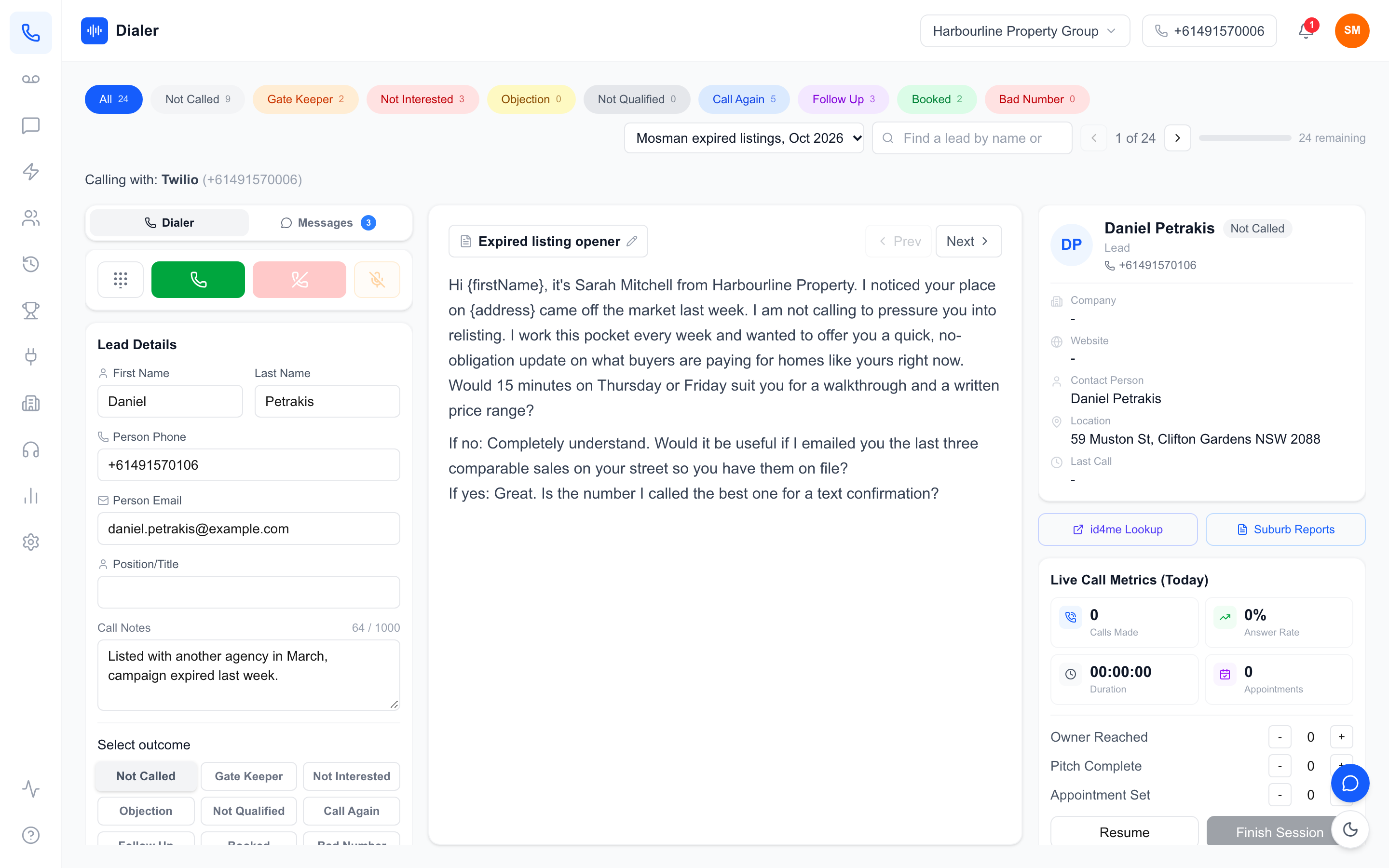
Agencies can upload suburb sales reports from PriceFinder as PDFs, labelled by suburb and postcode. Agents open them from the Suburb Reports button in the dialler while they are on a call, so recent sales are on screen when the homeowner asks what their street is worth.
One number, summaries and live metrics
Your team gets one dedicated Australian number included, and Veyce assigns a rep their own Australian number on request. In Power Dialler mode, agents work one call at a time with the next lead loaded when they are ready. Recorded calls are transcribed and summarised after the call, texts go out from the team number with replies in the SMS inbox, and principals see live session metrics and a leaderboard. You can read more on the Veyce page for real estate agencies.
Choosing with confidence
The right Australian real estate calling software is the one your agents will open every morning. Judge it on the things that matter in an agency: a number homeowners trust, imports that handle property data, shared lists, visibility for the principal and honest pricing for the whole office. Run the trial with a real washed list and two real sessions, then decide on your own numbers.
If you would like to test Veyce that way, start a free trial: 3 days from your first call and 100 calling minutes, no card required, and your Australian number is included. Compare it with the other tools on your list, and look at how the Veyce power dialler for Australian teams handles a full prospecting session.
Frequently asked questions
What is Australian real estate calling software?
It is software that helps agents make prospecting and database calls from Australian numbers, usually with a power dialler, shared lead lists, outcome logging, texting and reporting. The better tools also handle property data imports such as PriceFinder exports, keep numbers your Do Not Call Register wash flags out of your lists, and give principals a same-day view of calls made, conversations and appraisals booked across the whole office.
Does real estate calling software wash my lists against the Do Not Call Register?
Not necessarily, and you should check. Many tools, Veyce included, do not wash numbers themselves. You wash your list with the register or your data provider, then import it. In Veyce, numbers the wash marks as registered are left out of PriceFinder imports, and the Delete DNCR Numbers button clears flagged leads. The register says a wash is relied on for 30 days, so re-wash lists you keep calling.
How many seats does a real estate agency need?
Count everyone who makes or books prospecting calls: listing agents, BDMs, a principal who still prospects and any PA who books appraisals. People who only read reports may not need a calling seat. On Veyce, the Team plan covers four seats for $179 a month with extra seats at $29, and Growth covers ten seats for $449 a month, so most small and mid-sized agencies fall into one of those two.
Should agents use a power dialler or a predictive dialler?
For residential prospecting, a power dialler is usually the better fit. It dials the next lead only when the agent is ready, so the homeowner hears a person straight away instead of a pause. Predictive diallers ring several numbers and connect whoever answers, which suits large call centres more than agencies. Veyce is a power dialler, not a predictive dialler, with an optional Parallel Dialer add-on on Growth and Agency plans.
Can agents open suburb data while they are on a call?
In Veyce, yes. A principal or admin uploads suburb sales reports from PriceFinder as PDFs on the Integrations page, labelled with the suburb and postcode. Agents then open them from the Suburb Reports button in the dialler, which shows the list of reports beside the open PDF. That means recent sales are on screen when a homeowner asks what nearby homes have sold for, without switching to another app mid-call.