If you run a real estate office, the simplest way to track sales rep call performance is a short weekly review of each agent's prospecting calls, using numbers the phone system already captured. Most principals know prospecting drives listings, yet few can say with confidence how many calls each agent made last week, how many owners they spoke to or how many appraisals came from it. The answer usually depends on what the agent remembers to report.
This guide sets out a weekly call review built for Australian agencies and property teams. It covers what to track for each agent, how to read the numbers fairly when agents work different databases, what Veyce shows you per rep, and a 15-minute agenda you can run every Monday. The same approach works for any small outbound team, but the examples here come from property prospecting: appraisal calls, past-client check-ins and just-listed or just-sold calls around a sale.
Why real estate teams should track sales rep call performance
Tracking calls is not about watching agents. It is about seeing whether the prospecting plan you agreed on is actually happening, and fixing it early when it is not.
Prospecting is the listings pipeline
Listings come from conversations with owners, and conversations come from calls. When an agent's call activity drops for two or three weeks, the effect on listings shows up a month or two later, when it is too late to fix quickly. Weekly tracking surfaces the drop while there is still time.
Activity swings with the listing workload
An agent with four campaigns running has less time to prospect than one with none. That is normal, but it should be a visible choice, not a silent slide. Tracking calls next to the agent's current workload lets you agree on a realistic minimum for busy weeks.
Fair comparisons between agents
Agents rarely call the same kind of list. One works a farm area of cold homeowners; another rings past clients and buyer enquiries. Without tracking, the agent with the warmer database looks like the better caller. With tracking by list and outcome, you can compare like with like.
What to track for each agent
Keep the list short. Four groups of numbers cover what a principal needs.
Calls made and calling sessions
How many calls the agent made and how many prospecting sessions they ran. Sessions matter because two focused hours beat ten scattered calls between appointments. If calls are steady but sessions are many and short, prospecting is being squeezed into gaps.
Conversations and appraisals booked
Connected calls show how often the agent reached someone. Appraisals booked are the result most offices care about. Divide one by the other and you get a booking rate per conversation, which tells you more about call quality than raw bookings do.
Outcome mix by list
What share of calls ended as Follow Up, Not Interested, Objection or Bad Number? A farm area with a high Bad Number share needs better data, not more effort. A database with many Follow Ups is full of future listings, provided someone actually calls back.
Follow-ups due
The number of leads waiting on a callback. A growing pile of overdue follow-ups is the clearest sign an agent is too stretched to prospect properly. In property, follow-ups are often the most valuable leads on the list: an owner who said "maybe after Christmas" or "once the kids finish school" has told you when to call. Track how many follow-ups were called in the week, not just how many exist, because a list that only grows means those timing cues are being missed and the listing may go to whichever agent rang back first.
Veyce: per-rep tracking for agencies
Veyce is a power dialler for Australian sales teams, and it suits agencies doing appraisal and database calling. The dialler also shows a Follow-ups Due count, so overdue callbacks stay visible. See how it fits property work on our real estate agents page.
Reports for one agent or the whole office
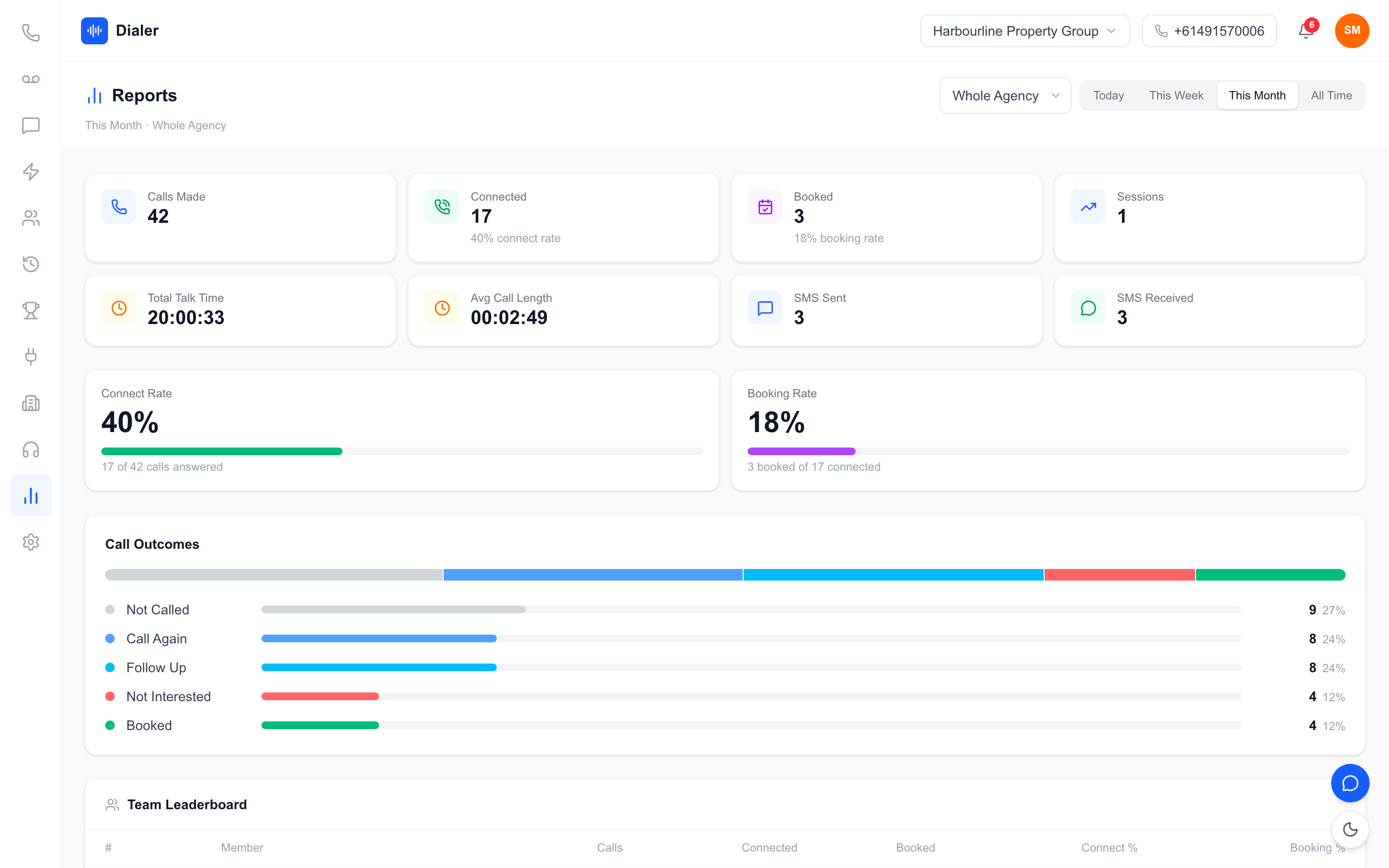
The Reports page shows calls made, connected calls with connect rate, bookings with booking rate, sessions, total talk time, average call length, and SMS sent and received. Switch from Whole Agency to a single member to see one agent's figures for today, this week, this month or all time, along with a chart of their call outcomes.
Team leaderboard
On the whole-agency view, the team leaderboard lists each agent's calls, connected calls, bookings, connect percentage and booking percentage, ranked by bookings and then calls. Click a row to open that agent's own report.
Session History and recorded calls
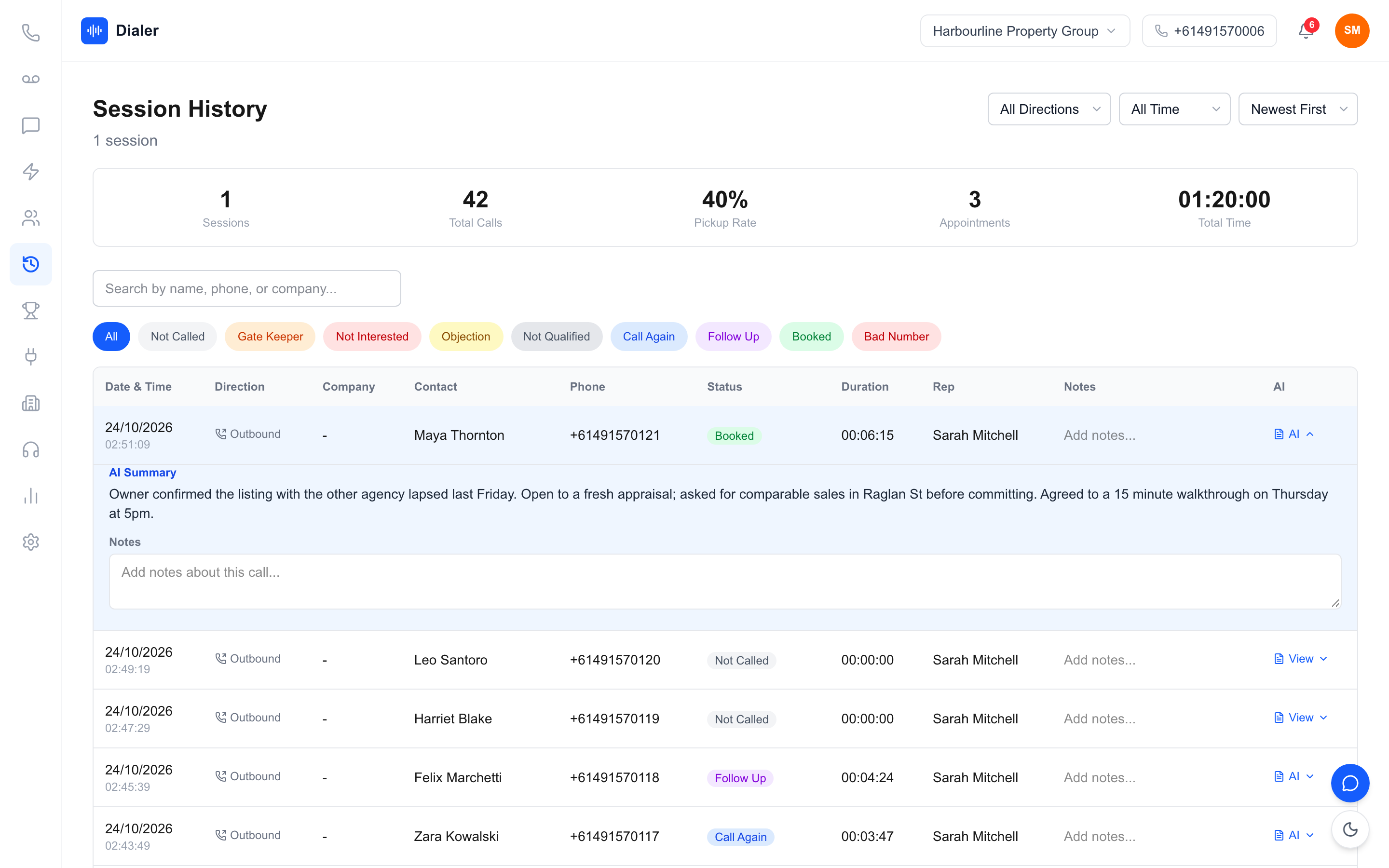
Session History lists each agent's sessions and calls with company or contact, phone number, outcome, duration and notes. For calls made through your Veyce number with recording turned on (call recording comes on the Team, Growth and Agency plans), you can open the recording, a transcript and an AI summary produced after the call ends, which is useful when a promising appraisal lead goes quiet and you want to know what was said.
Outcomes in your office's words
An owner can rename and reorder the call outcomes in Settings, so "Booked" can read "Appraisal Booked" and the labels match how your office talks. Reports and Session History use the same labels. For more on how agencies set up calling, read our guide to the power dialler for real estate agents in Australia.
Running the weekly call review
Fifteen minutes per agent, same day each week, same order every time.
A 15-minute agenda
- Open the agent's report for This Week and compare it with last week.
- Check sessions and calls against the minimum you agreed for their current workload.
- Look at connect rate, then booking rate. Discuss the one that moved.
- Open the outcome chart and the follow-ups due. Agree which follow-ups get called this week.
- If a key call went wrong, play the recording or read the summary together and agree one thing to try.
A worked example
These figures are a worked example with stated assumptions, not Veyce data or an industry benchmark. Assume an agent with two campaigns running agreed on a minimum of three one-hour sessions this week. The report shows two sessions, 90 calls, 27 connected (a 30% connect rate) and 2 appraisals booked (a 7% booking rate on conversations). The conversation is not "make more calls"; it is "what took the third session, and can it be protected next week?" The booking rate is in line with recent weeks, so call quality is not the issue.
Handling a quiet week
A quiet week usually has a reason: an open home schedule, settlement issues, a sick day. Record the reason beside the numbers. Over a few months those notes show the pattern behind each agent's activity, such as a dip every time a big campaign launches, which helps you plan support before the next one rather than react after it. Two quiet weeks in a row with no clear reason is the point to talk about the prospecting plan itself.
Keeping it fair and within the rules
Compare agents only on similar lists, and say so in the review. If your prospecting calls are telemarketing calls, the Do Not Call Register industry FAQs explain when you need to wash numbers and what calling hours apply. Veyce works with your wash: numbers the wash marks as registered are left out of PriceFinder imports, and the Delete DNCR Numbers button clears flagged leads.
Conclusion: a review agents can trust
To track sales rep call performance in a real estate office, keep it weekly, short and fair: calls and sessions, conversations and appraisals, outcome mix and follow-ups due, compared with last week and the agreed minimum. When agents see the review is about protecting prospecting time rather than catching them out, the numbers get more honest and more useful.
To run this review from real call data, the Veyce power dialler for Australian teams records calls, outcomes and per-agent reports as your office dials. Plans are on the Veyce pricing page, and the free trial runs for 3 days from your first call, with 100 calling minutes and no card.
Frequently asked questions
How do I track sales rep call performance in a real estate agency?
Use a dialler or phone system that logs every call with an outcome, then review each agent weekly. Look at calls made and sessions run, connected calls and appraisals booked, the outcome mix and follow-ups due, compared with the previous week. Keep the review to about fifteen minutes and run it on the same day each week, so agents know what to expect and the numbers become routine rather than a surprise.
How many prospecting calls should a real estate agent make?
There is no reliable universal figure, because it depends on the agent's market, database and current campaigns. A more useful approach is to agree a minimum number of protected prospecting sessions per week, adjusted for workload, and track whether those sessions happen. Agents running several campaigns may agree a lower minimum for a few weeks. What matters is that the choice is visible and agreed rather than a silent slide.
Can I see one agent's call numbers in Veyce?
Yes. On the Reports page, switch from Whole Agency to a single member to see that agent's calls made, connected calls, connect rate, bookings, booking rate, sessions, talk time, average call length, SMS and outcome chart for today, this week, this month or all time. On the whole-agency view, clicking an agent's row in the team leaderboard opens the same single-agent report.
Is it fair to compare agents on call numbers?
Only when they are calling similar lists. An agent ringing past clients and buyer enquiries will connect and book far more often than one working a cold farm area, regardless of skill. Compare each agent with their own previous weeks first, then compare agents who share a list type. Saying this openly in the review keeps agents engaged and stops the numbers becoming a source of resentment in the office.
Do real estate prospecting calls need to follow Do Not Call rules?
Calls that market a service to homeowners can be telemarketing calls, and the Do Not Call Register rules and calling hours can then apply. The register's industry FAQs explain when the rules apply and how washing works, and you should check your own situation there. Veyce works with your wash: numbers the wash marks as registered are left out of PriceFinder imports, and the Delete DNCR Numbers button clears flagged leads.