An outbound sales call workflow is the fixed sequence your team follows from a raw list of numbers to a booked meeting: preparing the list, calling, recording the outcome, following up and reviewing what happened. When every rep follows the same steps, leads stop falling through the cracks, managers can compare results fairly, and a new starter can be productive in days rather than weeks.
This guide sets out a practical seven-step workflow for Australian outbound teams, with what to decide at each step and the common points where calls are wasted. It suits real estate, solar, finance, insurance and B2B teams, and you can run it with any dialler, a CRM and a shared calendar. Where it helps, we show how the steps look in Veyce.
Outbound sales call workflow, part one: list and script
Step 1: Prepare and wash the list
Every outbound sales call workflow starts with the list. Before anyone dials, clean it:
- Remove duplicates and numbers with missing digits.
- Split the list by campaign, suburb or source so results can be compared later.
- Record where each lead came from: a web enquiry, an open home sign-in, a past client or a purchased list.
- Wash it against the Do Not Call Register if you are making telemarketing calls, and keep the date of the wash. The Do Not Call Register washing process explains how washing works and how long results can be relied on.
A clean list is the cheapest performance improvement available. Every bad number dialled is a minute nobody gets back.
Step 2: Write a script with a clear next step
A script is a map, not a speech. It should cover a short opener (who you are, why you are calling), two or three questions, answers to the three most common objections and a specific ask, such as an appraisal, a site visit or a fifteen-minute call. Keep it in one shared place so everyone works from the latest version, and let experienced reps keep a personal version.
Step 3: Plan the calling block
Decide when the team calls and for how long. Blocks of an hour or two with a short break work better than calling scattered through the day. Telemarketing calls in Australia are subject to calling-hour rules under the telemarketing industry standard, so check those hours against each lead's local time, not yours, before you set the schedule.
During the call block: dial, talk, tag
Step 4: Dial in sessions, not one-offs
Treat each calling block as a session with a start and a finish. A session gives you a clean count of calls, conversations and appointments for that block, and it makes it obvious when someone has stopped. A power dialler helps here by calling the next lead as soon as the rep is ready, which removes the dead time of looking up and typing numbers.
Step 5: Tag every call with one outcome
The outcome is the most important click in the whole workflow. It decides what happens to the lead next. Agree a short, fixed set and define each one so two reps would tag the same call the same way. A practical set:
| Outcome | Meaning | What happens next |
|---|---|---|
| Not Called | Not yet attempted | Stays in the queue |
| Gate Keeper | Reached someone other than the decision maker | Call again at a better time |
| Call Again | No answer or bad timing | Back into the queue |
| Follow Up | Interested, needs another conversation | Scheduled callback |
| Objection | Raised a concern you could not resolve | Review the call, maybe retry later |
| Not Qualified | Not a fit | Removed from the campaign |
| Not Interested | Clear no | Removed from the campaign |
| Booked | Appointment set | Confirmation sent, handed to calendar |
| Bad Number | Wrong or disconnected | Removed and fixed in the source |
Add a one-line note on anything that is not a clean no. The next rep to call that lead should not have to start again.
Keep momentum between calls
Wrap-up time is where blocks lose pace. Aim to tag and note within seconds of hanging up, then go straight to the next lead. If a call needs a longer note, flag it and finish the note at the end of the session rather than stalling the block.
After the call: follow-up and review
Step 6: Follow up on a schedule, not from memory
Most bookings come from the second or third conversation, not the first, so the follow-up step matters as much as the first call. Rules that work:
- Every Follow Up gets a specific callback time, ideally one the lead agreed to.
- Every Booked lead gets a confirmation text with the day, time and your name.
- Leads that said no leave the active list, so nobody calls them twice by accident.
- Callbacks due today are worked first in the next session.
Step 7: Review the session and the list
At the end of each block, look at three numbers per rep: calls, connected calls and bookings. At the end of the week, look at the list too: how many leads are still Not Called, which source books best, and which outcomes are piling up. A high Not Called count means a list is going stale; a pile of Objection outcomes means the script needs work.
A worked example of a calling block
This is an illustration with stated assumptions, not data from any team. Assume one rep calls for 90 minutes, places 60 calls, connects with 15 people and books 2 appointments, with 4 Follow Ups and 9 clear noes. Under this workflow, the 2 bookings get confirmation texts straight away, the 4 Follow Ups get callback times inside the next calling window, the 9 noes leave the list, and the 45 unanswered calls go back into the queue as Call Again. Nothing depends on the rep remembering anything tomorrow.
Veyce: the workflow built into one dialler
List, script and session in one place
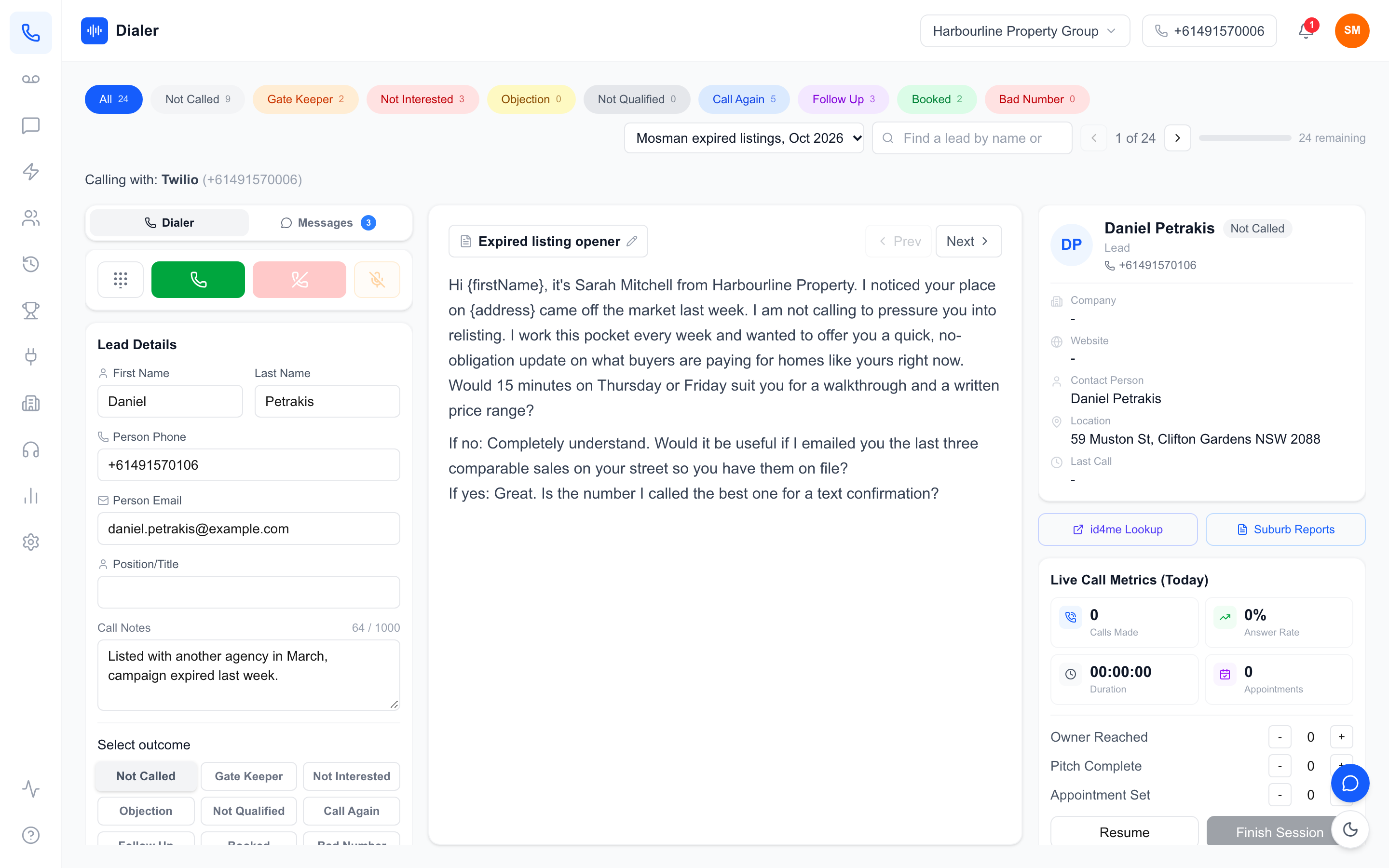
Veyce is a managed power dialler for Australian teams. Leads come in from spreadsheets, PDFs and photos, using OCR and rule-based mapping, or are imported from Google Sheets. Veyce works with your wash: numbers the wash marks as registered are left out of PriceFinder imports, and the Delete DNCR Numbers button clears flagged leads. Each list can also carry the date it was washed; Veyce records the date, it does not wash the list. Scripts can be typed in or synced from Google Docs, and each rep can keep a personal version. In Power Dialler mode, the dialler moves to the next lead when the rep finishes a call, one call at a time.
Outcomes that move the lead
The nine outcomes in the table above are Veyce's defaults, and owners can rename them in Settings. Tagging a lead Not Interested, Objection, Not Qualified or Booked moves it to a Spoken to list, so a session on the original list never calls it twice; Call Again and Follow Up stay put. With Text after Booked switched on, a Booked outcome sends the lead your template from the rep's number, with an opt-out added. A rep can also text a lead a link to choose a callback window inside calling hours, and the dialler shows a callbacks-due banner when it arrives.
Review with recordings and reports
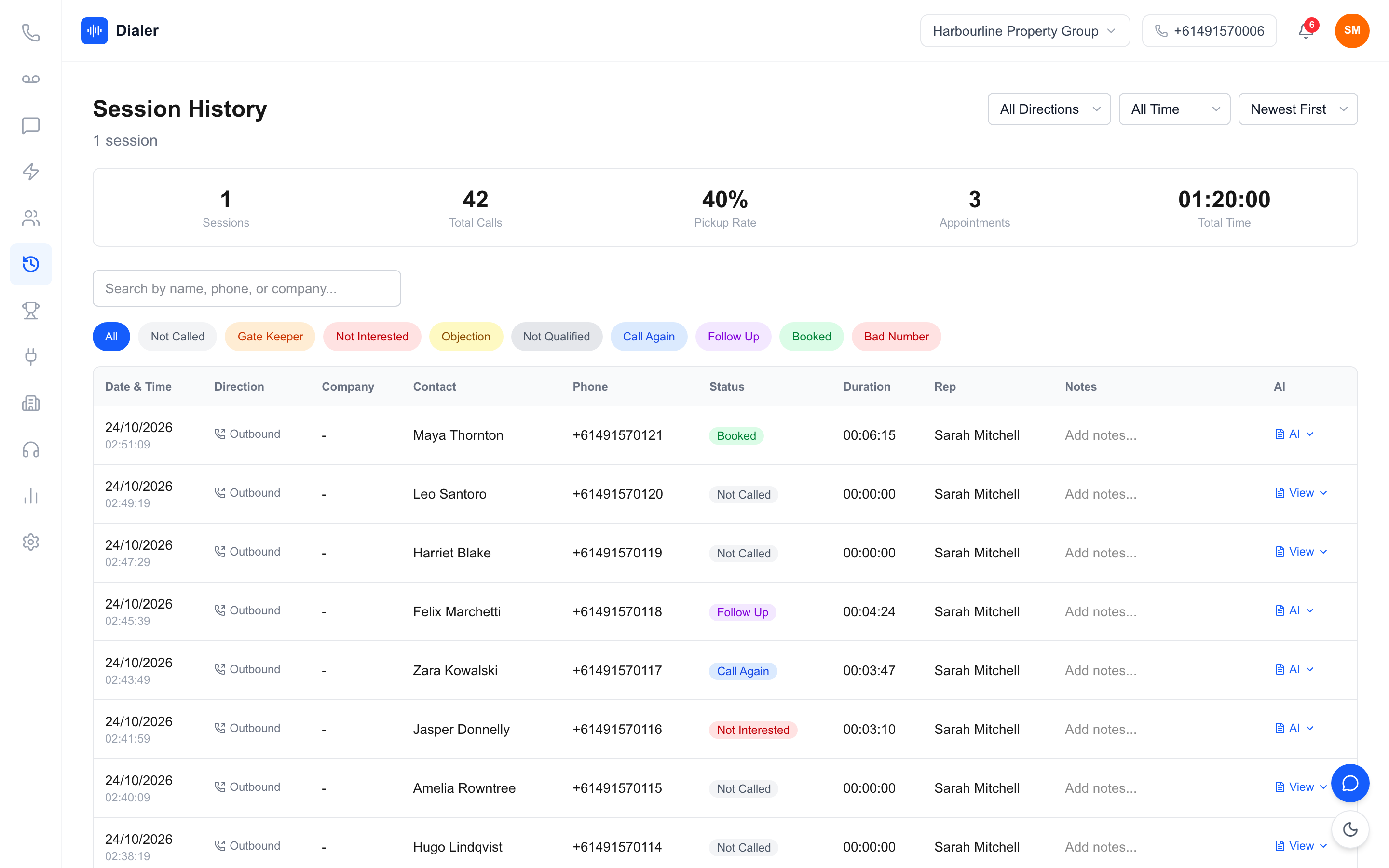
Session History lists every call with its outcome, duration and rep, filterable by outcome, and recorded calls get an AI transcript and summary after the call. Owners see Reports by rep and period, with a call outcomes breakdown. Teams on Growth and Agency can add the Parallel Dialer, which places calls only on weekdays 9am–8pm and Saturdays 9am–5pm, in the lead's local time, and not on Sundays or public holidays. Plans start at $49 a month; see Veyce pricing for every team size.
Conclusion: write the workflow down
An outbound sales call workflow only works if it is the same for everyone. Clean and wash the list, script a clear next step, call in planned sessions, tag every call with one agreed outcome, follow up on a schedule and review the numbers weekly. Write it on one page and walk every new rep through it on day one.
To run the whole workflow in one tool, start a free trial: 3 days from your first call and 100 calling minutes, no card. Import a list, set your script and run one session end to end. If your team prospects property, see how it fits real estate agencies.
Frequently asked questions
What is an outbound sales call workflow?
It is the fixed sequence a team follows for outbound calling: prepare and wash the list, write a script with a clear ask, plan calling blocks, dial in sessions, tag each call with an outcome, follow up on a schedule and review the results. Writing it down means every rep handles leads the same way, nothing depends on memory, and managers can compare reps and lists fairly instead of guessing why results differ.
What call outcomes should a sales team use?
Use a short, fixed set that everyone defines the same way, and link each outcome to what happens next. A practical set is Not Called, Gate Keeper, Call Again, Follow Up, Objection, Not Qualified, Not Interested, Booked and Bad Number. Clear noes leave the active list, Follow Ups get a callback time, bookings get a confirmation, and bad numbers are fixed at the source so they are not dialled again.
Do I need to wash my list against the Do Not Call Register?
If you make telemarketing calls to Australian numbers, the Do Not Call Register rules are likely to apply, and washing is how businesses check numbers against the register. The official donotcall.gov.au site explains who must wash, how washing works and how long results can be relied on. Get advice if you are unsure whether your calls are covered. Veyce works with your own wash rather than washing lists itself.
How long should an outbound calling session be?
Many teams find blocks of an hour or two, with a short break, keep energy and pace higher than calls spread through the day. Plan blocks inside the permitted calling hours for each lead's local time, and treat each block as a session with a start and finish so you get a clean count of calls, conversations and bookings. Work callbacks due that day at the start of the next session.
Can Veyce run this workflow?
Yes. Veyce imports lists from spreadsheets, PDFs and photos, works with your Do Not Call wash, syncs scripts from Google Docs and runs calling sessions in Power Dialler mode. Its nine default outcomes match the table in this guide, tagged leads move to a Spoken to list, and Text after Booked can send a confirmation automatically. Plans start at $49 a month, and the free trial gives you 3 days, counted from your first call, and 100 calling minutes.