Australian outbound sales software is only as good as the workflow it supports, and most teams buy it backwards. They compare feature lists, pick the tool with the longest one, and then discover that leads still arrive in five different spreadsheet layouts, the script lives in someone's inbox, and follow-up texts go out from a rep's personal mobile. The software dials, but the work around the dialling stays manual.
This guide takes the opposite approach. It maps the outbound sales workflow an Australian team actually runs, from a raw lead list to a booked meeting, and shows what software has to do at each step. Use it to audit your current setup, to brief a vendor, or to run a fair trial. It is written for small and mid-sized teams in sectors like real estate, solar, finance, insurance and B2B services, where a handful of reps make most of the calls and nobody has time to babysit the tools.
What Australian outbound sales software has to do
Outbound selling is a chain of small jobs. If one link is manual, the whole chain slows to the speed of that link. Good outbound sales software covers five jobs well rather than fifty jobs badly.
Get leads in without a data-entry afternoon
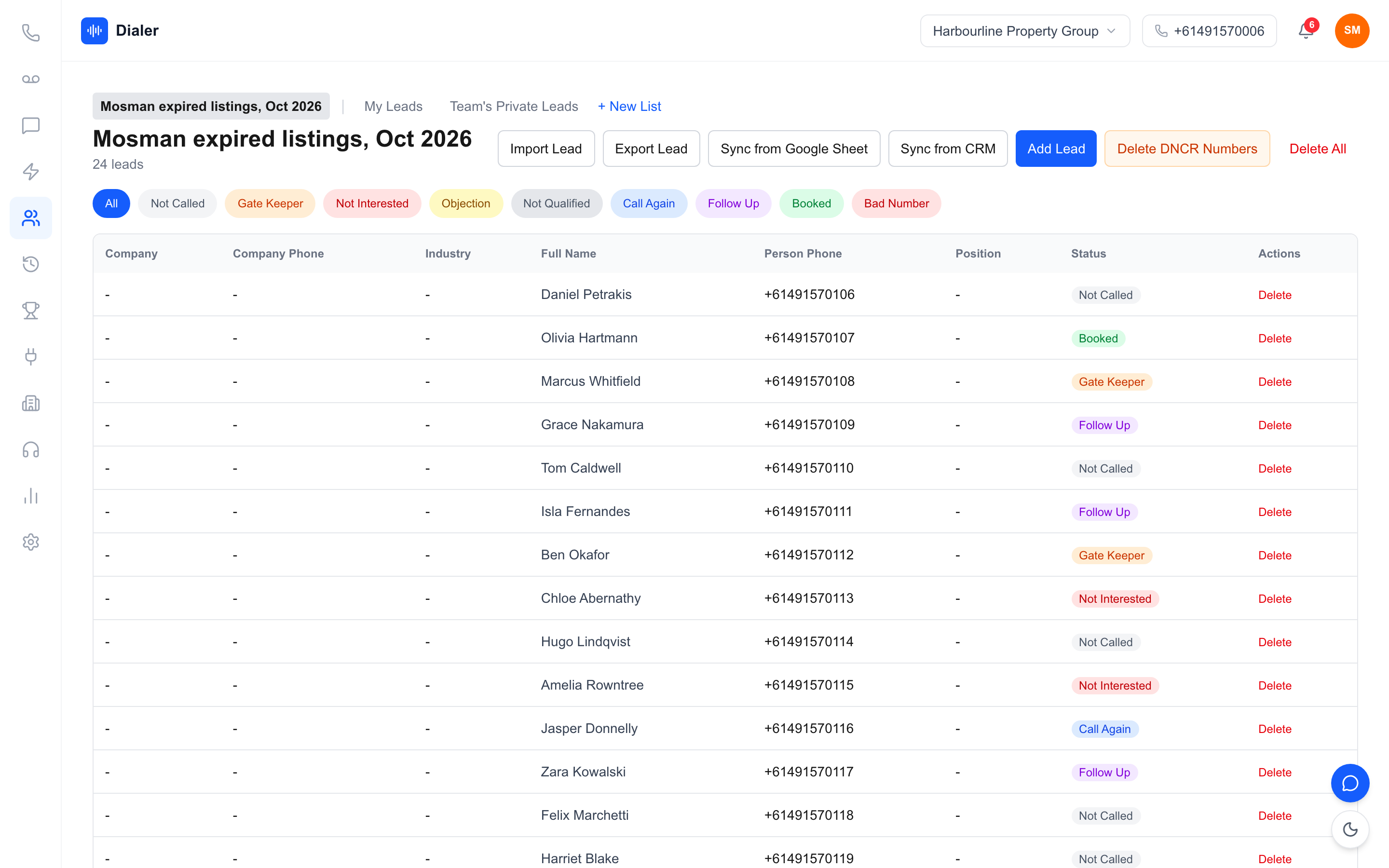
Leads arrive as CSV exports, Google Sheets shared by a marketing agency, PDFs from a data provider, and sometimes a photo of a printed list. If every format needs a rep to retype names and numbers, you lose the first hour of the day before anyone picks up the phone. Look for import that reads the common formats and maps columns (name, phone, email, company, address) to the right fields, then lets you check the mapping before it saves. Rule-based mapping is predictable: the same layout maps the same way every time.
Put the script in front of the rep
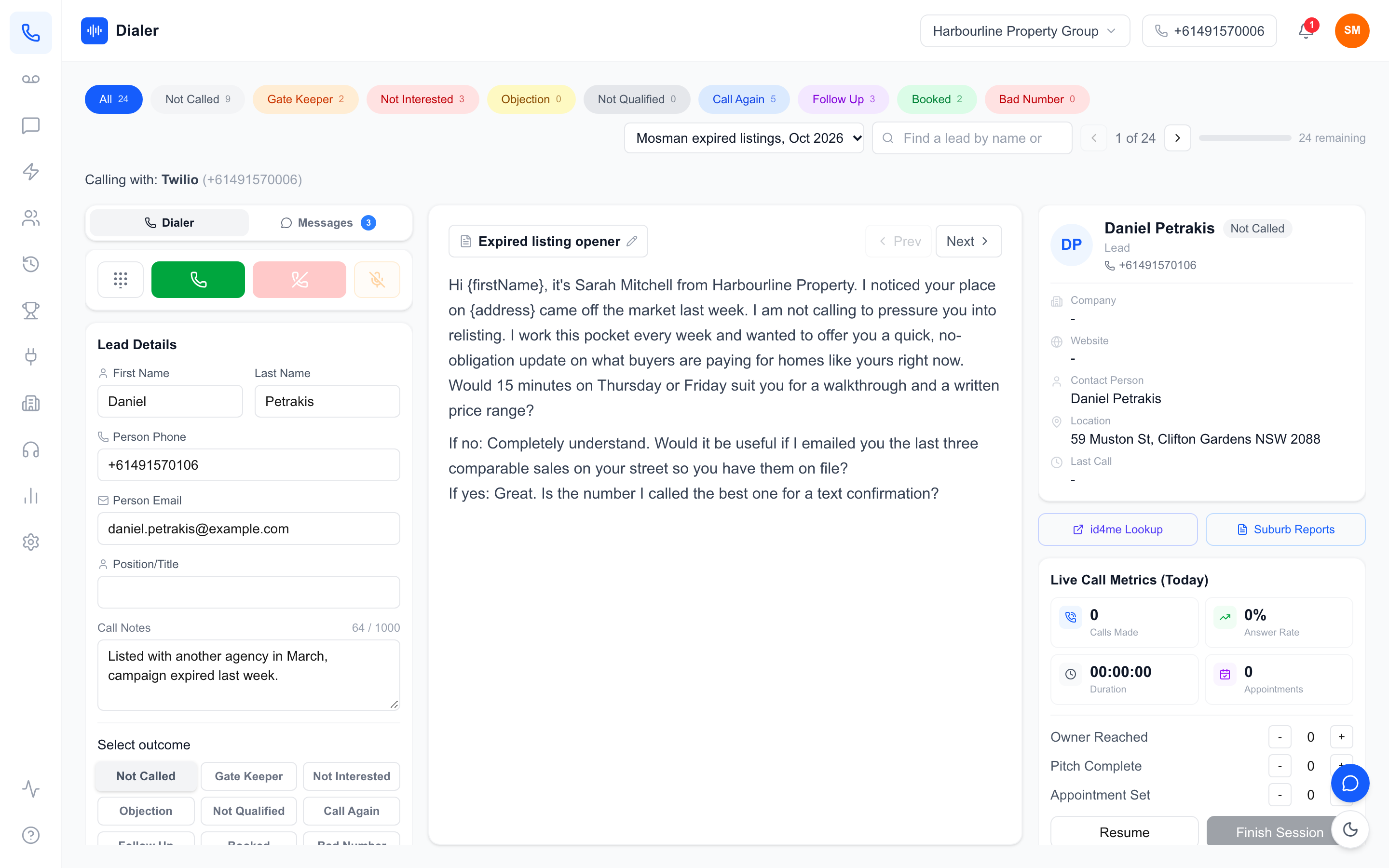
A script that lives in a shared drive is a script nobody opens mid-call. The software should show the current script beside the lead card, so a new rep can follow the opening, the qualifying questions and the close without switching windows. Managers should be able to change it once and have every rep see the new version.
Dial, log and move on
The core of the tool is the dialler. A power dialler calls the next lead as soon as the rep has logged the outcome of the last one, which removes most of the clicking and typing between conversations. If you want the detail on dialling modes, our explainer on power dialler versus auto dialler covers the trade-offs. Outcome logging should be one tap: booked, callback, not interested, wrong number, and whatever labels match your sales process.
Follow up and report
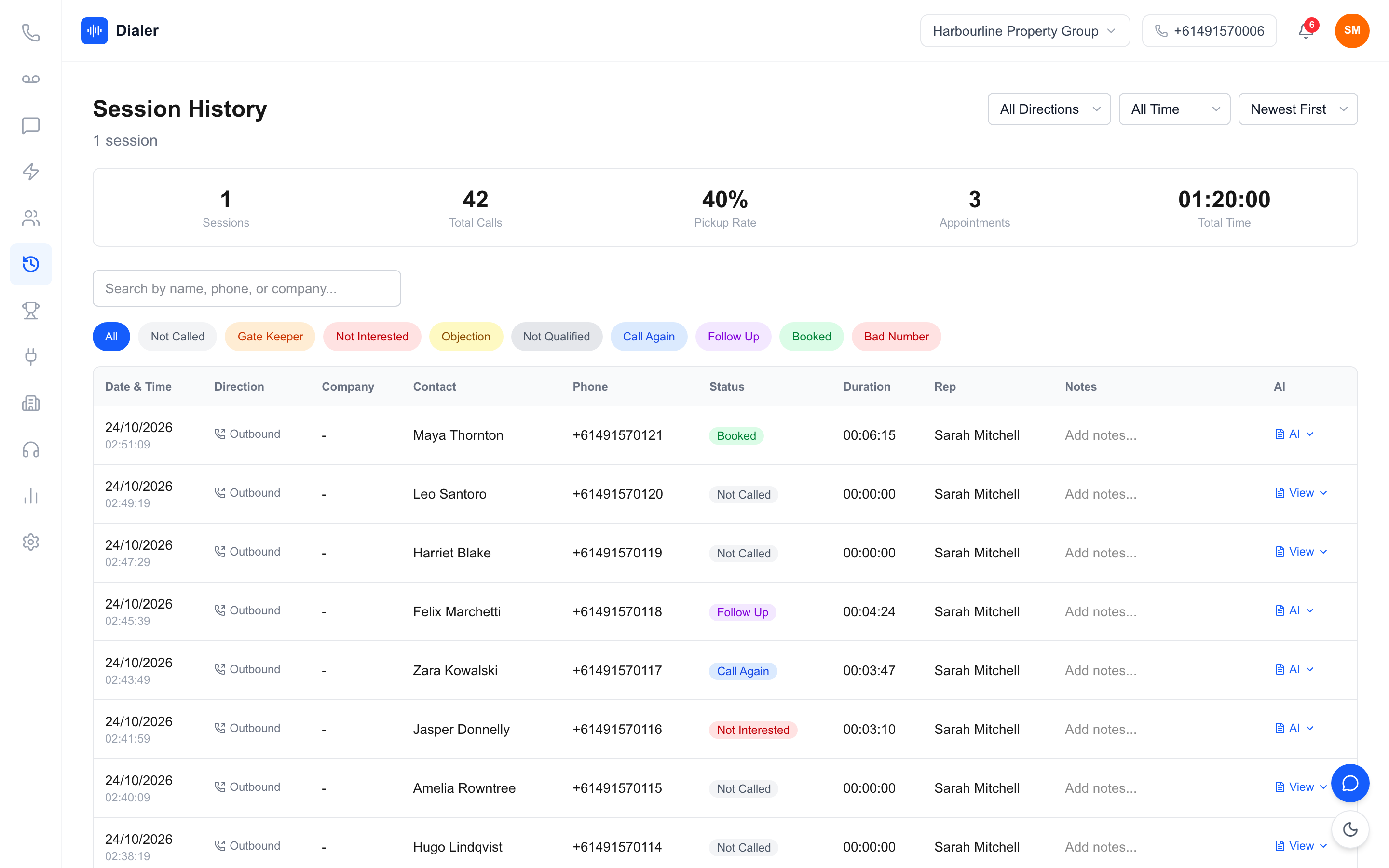
Most meetings are booked on the second or third touch, not the first call. The software should make the follow-up easy (a text from the same number, a callback reminder) and show managers what happened in each session without a spreadsheet at the end of the week.
Mapping your outbound sales workflow step by step
Here is the workflow most Australian outbound teams settle into once the tools stop getting in the way. Run your shortlisted software through each step during a trial.
Step 1: source and wash the list
Before a number goes near a dialler, the list needs to be legal to call. If you make telemarketing calls, the Do Not Call Register rules apply, and the usual practice is to wash your list against the register through the official service before calling. The Do Not Call Register washing process explains how it works and how long a wash result stays valid. Check whether your software keeps the wash result attached to the list and makes it easy to clear numbers the wash flagged.
Step 2: import and map fields
Import the washed list, check that phone numbers have been read correctly (Australian mobiles and landlines in a consistent format), and split it into lists that make sense for a calling session: by suburb, by source, by product. Smaller, focused lists keep sessions coherent and make reporting meaningful.
Step 3: run focused calling sessions
Block out a calling session, open one list, and let the dialler run. The rep reads the script panel, has the conversation, logs the outcome, and the next call starts. A session should end with a clear record: how many calls, how many conversations, how many meetings or callbacks. If you have never run structured sessions, our cold calling tips for Australian teams cover how to plan them.
Step 4: follow up the same day
The leads who said "send me something" or "call me Thursday" are the warmest you will get all week. Send the follow-up text before the session ends, set the callback, and make sure any reply lands in front of the rep who made the call. When that loop is tight, booked meetings stop depending on memory.
Local details to check in Australian outbound sales software
Plenty of good software is built for the US market and works less well here. These are the Australian details that decide whether a tool fits.
Australian numbers and caller ID
Prospects are more likely to answer a local Australian number than an unknown or overseas one. Ask whether the vendor supplies the Australian number or expects you to bring your own carrier account, whether replies and callbacks come back to that number, and whether individual reps can have their own number when they need it.
Minutes, mobiles and the real monthly cost
Headline seat prices hide the cost of calling. Check whether included minutes cover calls to Australian mobiles as well as landlines, whether minutes are pooled across the team, and what top-ups cost. Here is a worked example with stated assumptions, not a benchmark: a team of four reps, each spending about 15 minutes a day on calls across 20 working days, uses roughly 4 x 15 x 20 = 1,200 minutes a month. Compare that figure with each vendor's included minutes and top-up prices, and repeat it with your own numbers from a trial week.
Calling hours and the Do Not Call Register
Telemarketing calls in Australia are subject to an industry standard that covers matters such as calling hours and identifying yourself on the call. Read the Do Not Call Register industry standards page and the industry FAQs for the rules, and treat software features as help with your process rather than a substitute for it. Our DNCR guide for Australian businesses walks through the basics.
Veyce: outbound sales software built for Australian teams
Veyce is a power dialler for Australian sales teams that covers the workflow above in one browser app, with the phone side included.
Lead import from spreadsheets, PDFs and photos
Veyce imports leads from CSV files and spreadsheets, and reads PDFs and photos of lists with OCR, then maps the columns with rules you can check before saving. It also imports leads from Google Sheets on demand. Veyce does not wash numbers against the Do Not Call Register; it works with your wash: numbers the wash marks as registered are left out of PriceFinder imports, and the Delete DNCR Numbers button clears flagged leads.
Scripts, outcomes and texts in the dialler
The team script sits in the middle of the dialler, typed in directly or loaded from a Google Doc, and a rep can keep a private script of their own. In Power Dialler mode, Veyce calls one lead at a time and moves to the next as soon as the rep logs an outcome. Your team gets one dedicated Australian number included, and Veyce assigns a rep their own Australian number on request. Texts go out from the team number, or from the rep's own number if one is assigned, and replies come back into the Messages inbox. Recorded calls get an AI transcript and summary after the call, and managers see live session metrics and a leaderboard.
Plans and trial
Prices are public on Veyce's plans and pricing page: Solo is $49 a month (1 seat, 100 minutes), Team $179 (4 seats, 400 minutes), Growth $449 (10 seats, 1,000 minutes) and Agency $1,099 (25 seats, 2,500 minutes), with extra seats at $29. The free trial runs for 3 days from your first call, with 100 calling minutes and no card. For a tour of the dialler itself, see the Australian power dialler overview.
Choosing your outbound stack: next steps
The best Australian outbound sales software is the one that removes manual steps from your actual workflow, not the one with the most features on a comparison page. Write down your five steps (source, import, call, follow up, report), note where time leaks today, and score each tool on those leaks.
Then run a real trial with a real list: import it, put your script in, run two sessions, send the follow-up texts, and read the session report. If the workflow feels shorter by the end of the week, you have your answer. You can start that test today with a Veyce free trial, which includes 100 calling minutes over 3 days from your first call.
Frequently asked questions
What is Australian outbound sales software?
It is software that helps a sales team make outbound calls to prospects in Australia and manage everything around those calls. A complete setup imports lead lists, shows the script during the call, dials the next lead automatically, logs outcomes, sends follow-up texts and reports on each session. The Australian part matters: local numbers, minutes that cover Australian mobiles and support for working with Do Not Call Register washes all affect whether a tool fits a local team.
Do I need a CRM as well as outbound sales software?
Not always. Many small teams run outbound from a dialler with lead lists, outcomes, notes and texts, and only add a CRM when deals get longer or more complex. If you already use a CRM, check how leads get into the dialler and how outcomes get back, so nobody types the same information twice. The test is simple: after a call, a rep should only have to record the outcome once.
Does outbound sales software wash my list against the Do Not Call Register?
Some tools offer it and many do not, so ask. Veyce does not wash or check numbers against the register. It works with your own wash: numbers the wash marks as registered are left out of PriceFinder imports, and the Delete DNCR Numbers button clears flagged leads. Whatever tool you use, the washing itself is done through the official Do Not Call Register service, and the obligations remain with the business making the calls.
How many reps do I need before outbound sales software is worth it?
One. A single rep calling for an hour a day loses a noticeable share of that hour to dialling, waiting and typing notes, and a power dialler removes most of it. Larger teams gain more from shared scripts, live session metrics and leaderboards. Veyce's Solo plan covers one seat with 100 minutes for $49 a month, and Team covers four seats with 400 minutes for $179.
How should I trial outbound sales software?
Use a real, washed list of a few hundred leads, load your actual script and run at least two full calling sessions. Send the follow-up texts the way you would in a normal week and read the session report afterwards. Compare conversations and booked meetings with a typical manual day. A Veyce trial runs for 3 days from your first call, with 100 calling minutes and no card, which is enough to test the full workflow on one list.