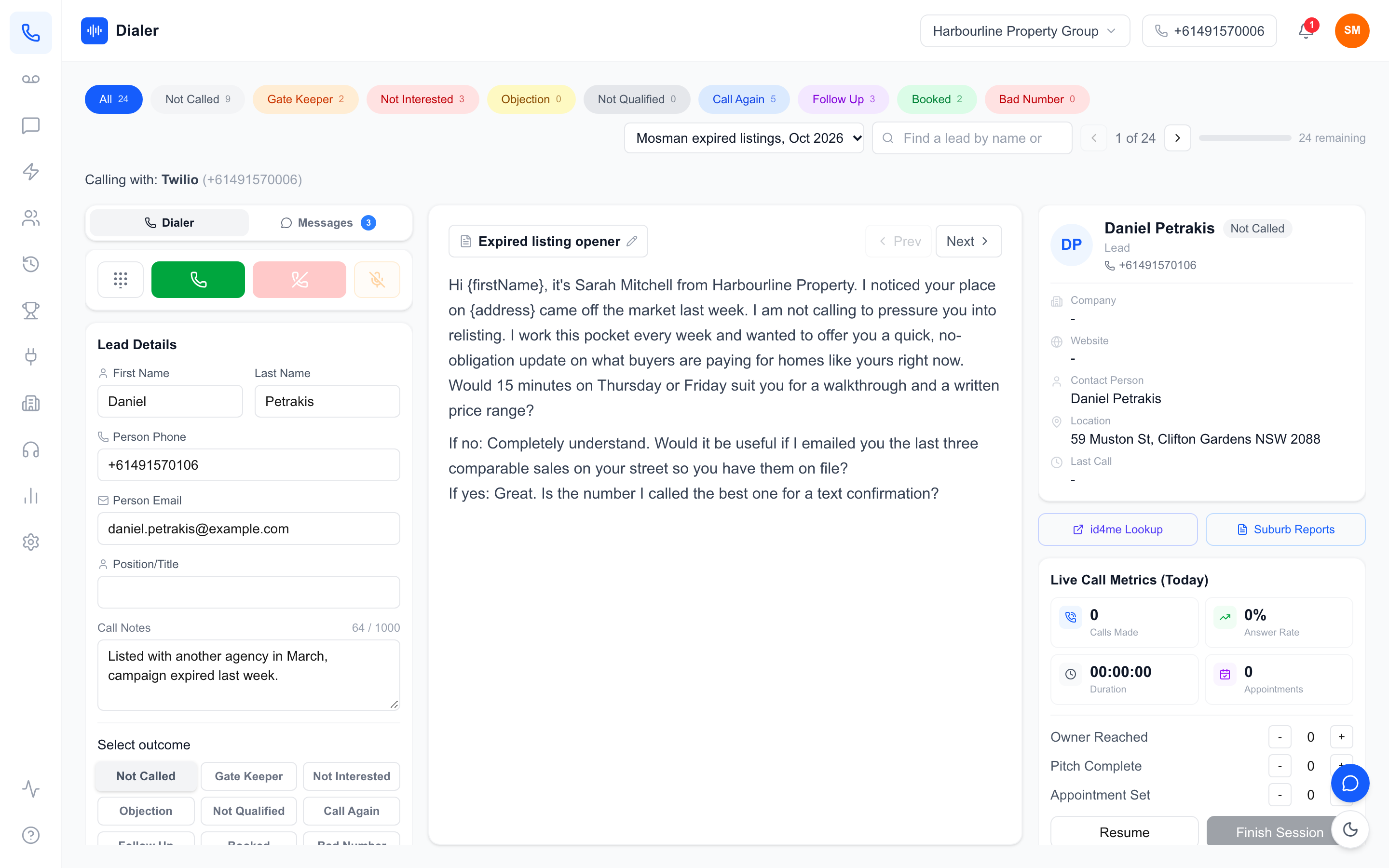
Sales dialler onboarding is the work of getting your team from "we bought a dialler" to "everyone is calling with it, every day, the same way". The software is usually the easy part. The hard part is moving lists, scripts and habits across without losing a week of calling, and making sure the reps who were happiest on their mobiles actually switch.
This guide gives Australian sales managers and principals a two-week onboarding plan: what to set up before reps log in, how to run the first calling sessions, how to handle the reps who resist, and how to tell whether the rollout worked. It applies to any dialler, and where it helps we show how each step looks in Veyce. It complements our guide to how a managed power dialler works, which covers the product side rather than the rollout.
Sales dialler onboarding setup: before reps log in
Decide who owns the rollout
Pick one person to own sales dialler onboarding from start to finish, usually the sales manager or an operations manager. They set up the account, import the first lists, write the outcome definitions and are the first stop for questions. Rollouts without an owner drift: half the team switches, the other half keeps calling from their mobiles, and the numbers stop meaning anything.
Set up numbers, lists and scripts first
Reps should log in to a dialler that is ready to call, not an empty shell. Before inviting anyone, the owner should:
- Confirm the calling number. Check which number leads will see and that callbacks reach the right person.
- Import one clean list. Choose a list the team knows, remove duplicates and bad numbers, and wash it against the Do Not Call Register if you make telemarketing calls. The Do Not Call Register industry FAQs cover who needs to wash and how.
- Load the script. Put the current script in the dialler so every rep starts from the same version.
- Define the outcomes. Write one line per call outcome so everyone tags calls the same way.
Write a one-page "how we call" sheet
One page, no more: when the team calls, which list to work, what each outcome means, how to book a meeting, and who to ask for help. Give it to every rep on day one. It does more for consistency than any training video.
A worked example of setup time
This is an illustration with assumptions, not a measured benchmark. Assume a four-rep team with one existing spreadsheet of leads and a script in a shared document. Cleaning and importing the list might take an hour, loading the script fifteen minutes, writing outcome definitions and the one-page sheet an hour, and inviting the team a few minutes. That is roughly half a day of the owner's time, done the day before reps start. Larger teams with several lists and CRMs will need longer.
Week one: first calls and first habits
Day 1: a short walkthrough, then real calls
Keep the first training session to thirty minutes: how to start a session, make a call, tag the outcome, add a note and finish the session. Then put everyone on the phones for an hour on the clean list. People learn a dialler by using it, not by watching someone else click through it.
Days 2 to 3: fix friction fast
The first days surface practical problems: a headset that echoes, a browser that blocks the microphone, a list with the wrong area codes, an outcome nobody understands. Fix them the same day. Every unfixed annoyance is a reason for a rep to slip back to their mobile.
Days 4 to 5: introduce the numbers
Once calling feels normal, show the team their own numbers: calls, conversations, bookings and talk time. Introduce the leaderboard or achievements if your dialler has them. Doing this in week one, not day one, means reps meet the numbers once they are comfortable, so the first figures reflect the tool rather than the learning curve.
Keep one source of truth
From day one, every call goes through the dialler. If a rep calls a lead from their mobile, that call is invisible: no recording, no outcome, no follow-up reminder. Make it a clear rule early, and explain the reason, which is that follow-ups and fair comparisons depend on it. Start a free 7-day Veyce trial with 50 calling minutes included.
Week two: consistency and review
Run the first one-to-one reviews
Sit with each rep for fifteen minutes. Look at their outcomes for the week, listen to one good call and one to improve, and agree one change for next week. If your dialler records calls and produces summaries afterwards, use them to choose which calls to listen to.
Handle the reluctant reps
Every team has a rep who was fastest on their own phone and sees the dialler as overhead. Do not argue in general terms. Show them their week-two numbers next to their old ones, if you have them, and point out what they no longer do by hand: dialling, looking up the next lead, writing follow-up reminders. If they still struggle, sit beside them for a session; the blocker is often one small habit, such as not knowing how to skip a lead.
Add the second list and integrations
Only when the first list is running smoothly should you connect a CRM or a shared spreadsheet, or import the next campaign. Adding everything at once makes it hard to tell whether a problem is the tool, the data or the process.
Measure whether onboarding worked
At the end of week two, ask four questions. Is every rep calling through the dialler every calling day? Are outcomes tagged consistently? Are follow-ups being worked from the dialler rather than from memory? Can the manager see the team's numbers without asking anyone? Four yeses means the rollout is done; anything else tells you exactly what to fix next.
Veyce: onboarding without telco setup
A number and minutes from the start
Veyce is a power dialler for Australian sales teams with the phone side managed for you: there is no telco account, SIP trunk or hardware to set up. Your team gets one dedicated Australian number included, and Veyce assigns a rep their own Australian number on request. Every plan includes calling minutes, shared across the organisation, and calls run in the browser (Chrome or Safari), with the option to add Veyce to a phone's home screen.
Lists, scripts and outcomes in an afternoon
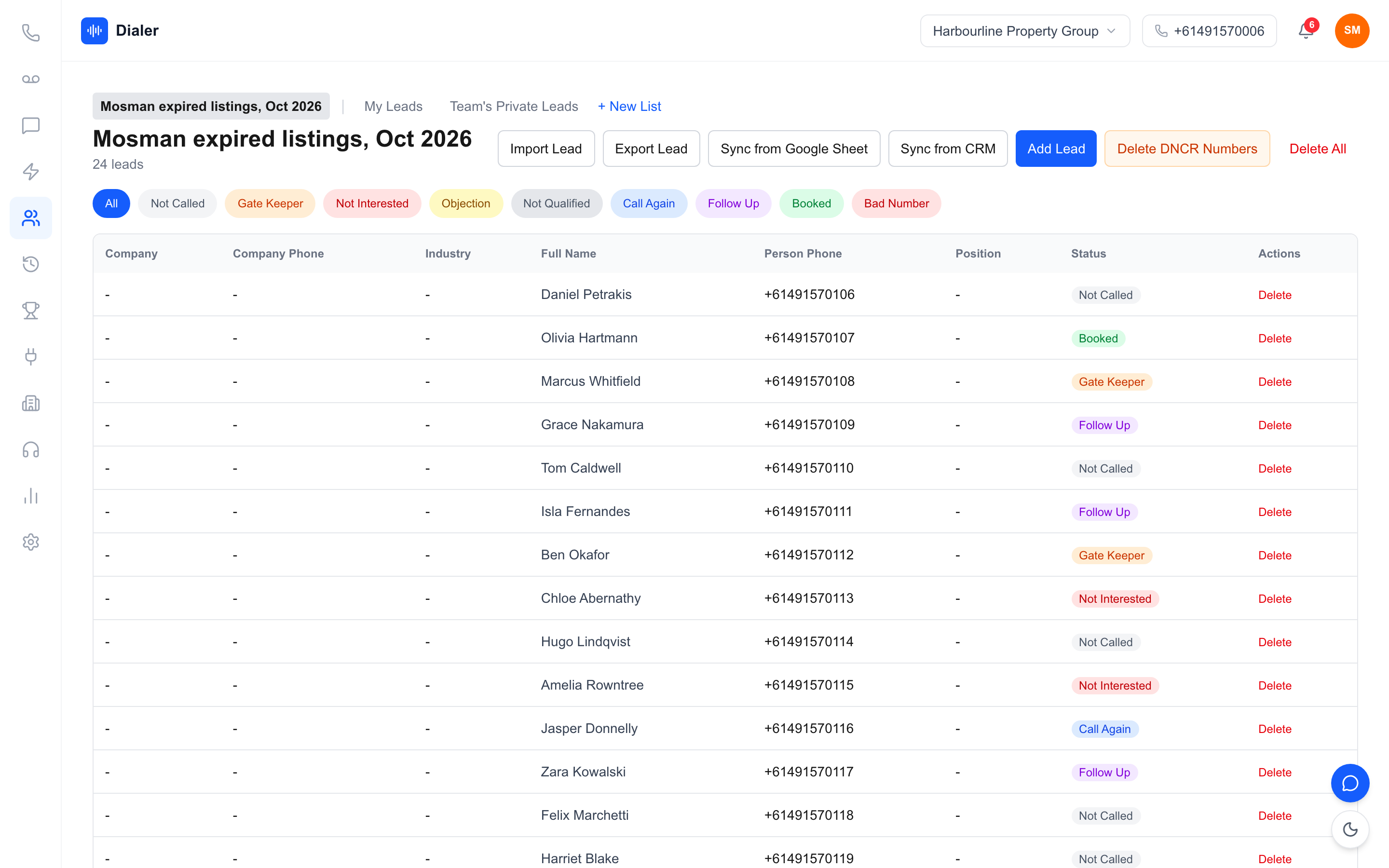
Lead import takes spreadsheets, PDFs and photos, using OCR and rule-based mapping, and lists can also be imported from Google Sheets. Veyce works with your wash: numbers the wash marks as registered are left out of PriceFinder imports, and the Delete DNCR Numbers button clears flagged leads. Scripts can be synced from Google Docs, and owners can rename the nine default call outcomes in Settings to match your one-page sheet.
Inviting the team and getting help
Owners add reps from Agency, Invite Member; each rep gets an email with a temporary password and sets their own on first login. Calls, conversations and appointments are counted from each rep's sessions automatically, and the Achievements page shows points, streaks and a weekly leaderboard from the first day. If you get stuck, the Veyce team can ask to open your account; you accept or decline on screen, and every visit is listed on your Agency page.
Trial and plans
The free trial runs for 3 days from your first call, with 100 calling minutes and no card, for one seat, which is enough for the rollout owner to complete the setup checklist and make real calls. Team is $179 a month with 4 seats and 400 minutes; see all Veyce plans and seat prices.
Conclusion: plan the first two weeks
Sales dialler onboarding succeeds when one person owns it, the dialler is ready before reps log in, and the first two weeks follow a plan: real calls on day one, friction fixed the same day, numbers introduced at the end of week one and reviews in week two. Keep every call in the dialler, add integrations once the basics work, and check the four end-of-fortnight questions.
To start the setup checklist today, begin a free trial: 3 days from your first call and 100 calling minutes, no card. Import your first list, load your script and make the first calls yourself before you invite the team.
Frequently asked questions
How long does sales dialler onboarding take?
For a small team with one clean list and an existing script, setup can be done in about half a day by one person, and a structured rollout takes around two weeks: real calls from day one, friction fixed in the first days, numbers introduced at the end of week one and reviews in week two. Larger teams with several lists, CRMs and campaigns should allow longer and add each integration one at a time.
What should be set up before reps start using a dialler?
Confirm the calling number leads will see and where callbacks go, import one clean list, wash it against the Do Not Call Register if you make telemarketing calls, load the current script and write a one-line definition for each call outcome. Put it all on a one-page sheet covering calling times, which list to work, how to book and who to ask. Reps should log in to a dialler that is ready to call.
How do I get reluctant reps to use the dialler?
Show rather than argue. Compare their numbers in week two with what they did before, if you have it, and point out the manual work that has gone: dialling, finding the next lead and writing follow-up reminders. Fix their practical problems the same day, sit beside them for a session to find the small habit that is blocking them, and make it a clear rule that every call goes through the dialler.
Do we need a telco account or hardware to onboard Veyce?
No. Veyce manages the phone side, so there is no telco account, SIP trunk or hardware to buy. Your team gets one dedicated Australian number included, Veyce assigns a rep their own number on request, and every plan includes calling minutes. Calls run in Chrome or Safari, and Veyce can be added to a phone's home screen. Reps join by email invite and set their own password on first login.
Can I trial Veyce before rolling it out to my team?
Yes. The free trial lasts 3 days, counted from your first call, with 100 calling minutes and no card, for one seat. Each trial call ends after 7 minutes. That is enough for the person running the rollout to import a list, load a script, set the outcomes and make real calls before inviting anyone. When you are ready to add the team, the Team plan is $179 a month with 4 seats and 400 minutes, and extra seats are $29 each.