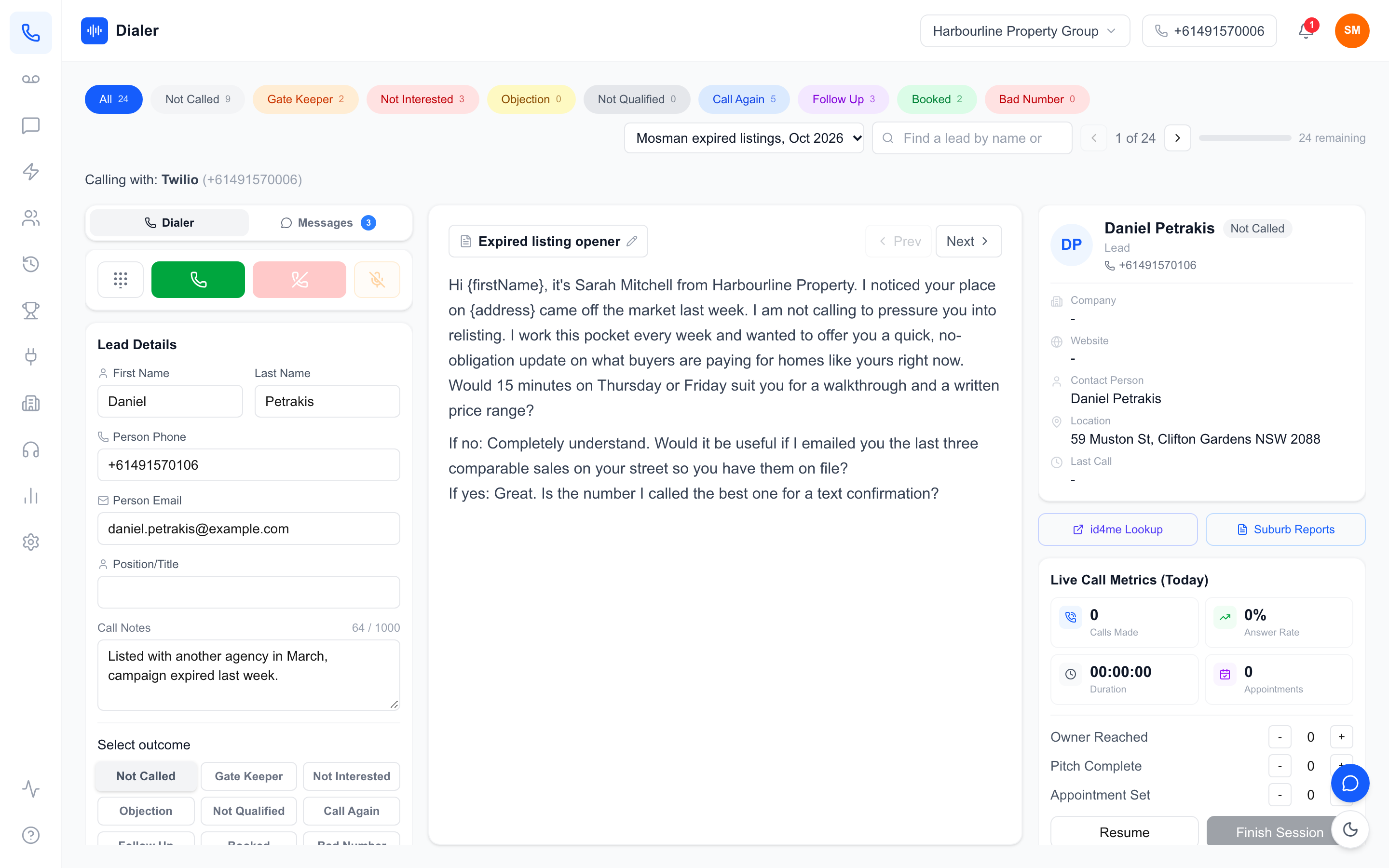
A power dialler with live call metrics shows reps how their calling block is going while it is still going: how many calls they have made, how often people are answering and how many appointments are on the board. That sounds like a small thing next to the dialling itself, but it changes behaviour. A rep who can see that answer rate has collapsed in the last half hour can switch lists or times now, not discover it in tomorrow's report.
This guide explains what live metrics in a dialler should show, how reps and managers actually use them during a session, how they connect to the reports you review each week, and what to check when you compare tools. It is written for Australian sales teams choosing or setting up a dialler, and it describes exactly what Veyce shows so you can judge it against anything else on your shortlist.
What a power dialler with live call metrics shows
A power dialler dials the next number for the rep after each call, so the rep spends the session talking rather than keying numbers. Live metrics add a running scoreboard for that session.
Live numbers versus end-of-day reports
Reports answer "how did last week go?". Live metrics answer "how is this block going?". Both matter, but they serve different people at different times. Live numbers are for the rep, during the call block, to pace themselves and react. Reports are for the manager, after the fact, to spot trends and plan. A dialler that only offers one forces you to guess at the other.
Calls made and answer rate
The two core live numbers. Calls made counts every dial in the session. Answer rate is answered calls divided by calls made, shown as a percentage. Together they tell a rep whether they are working hard enough and whether the list is responding.
Call time and appointments
Total call time for the session shows how much real conversation is happening; a session with lots of calls but very little call time usually means quick hang-ups or a list full of disconnected numbers. Appointments is the result that pays, and seeing it climb during the block is motivating in a way a monthly total never is.
Counters reps log themselves
Some steps cannot be detected by a phone system: whether the rep reached the decision maker, or got through the whole pitch. Good live metrics let reps tap a counter for these as they happen, so the funnel between "answered" and "booked" is visible too.
How reps use live metrics during a calling block
Live numbers are only useful if they change what happens next. These are the most common ways reps and managers act on them.
Pacing against a block goal
If the plan is a two-hour block, a rep can check at the halfway point whether they are on track. Falling behind at the halfway mark is easy to recover; discovering it at the end is not. This works best with activity goals the rep controls, such as calls in the block, rather than appointment targets that depend on who picks up.
Spotting a bad list early
A sudden drop in answer rate is the earliest warning of a list problem: aged data, wrong numbers or the wrong time of day for that audience. With live metrics the rep sees it after twenty or thirty calls and can flag it, rather than burning a whole block on a list that was never going to connect.
Knowing when the conversations are working
If owner reached is climbing but pitch complete is not, the opener is losing people. If pitch complete is healthy but appointments are not, the close needs work. Reps who can see this mid-session can try a different line on the next few calls while the difference is fresh.
A worked example
These numbers are a worked example with stated assumptions, not Veyce data or a benchmark. Assume a rep is 60 minutes into a block with 45 calls made and a 9% answer rate, against roughly 25% in their previous sessions on similar lists. Four answered calls in an hour suggests the list or the timing, not the rep. Switching to a fresher list for the second hour and comparing the answer rate is a quick test, and the live panel shows the result within a few dozen calls.
Veyce: live call metrics beside the dialler
Veyce is a power dialler for Australian sales teams. Live metrics sit on the calling screen next to the lead card and your calling script.
The Live Call Metrics panel
The panel shows today's session: Calls Made, Answer Rate, Duration (the total call time in the session) and Appointments. Below it, reps tap counters for Owner Reached, Pitch Complete and Appointment Set. In Power Dialler mode Veyce dials one lead at a time and auto-advances to the next lead after each call, so the numbers update as the rep works.
Each rep sees their own session
Each rep only ever resumes their own in-progress session, so live metrics are never mixed between two people calling at the same time. That matters in a shared office where several reps work the same list. It also means a rep who steps away for a meeting comes back to the same session and the same running totals, rather than starting a fresh count that makes the day look shorter than it was.
From the live session to reports
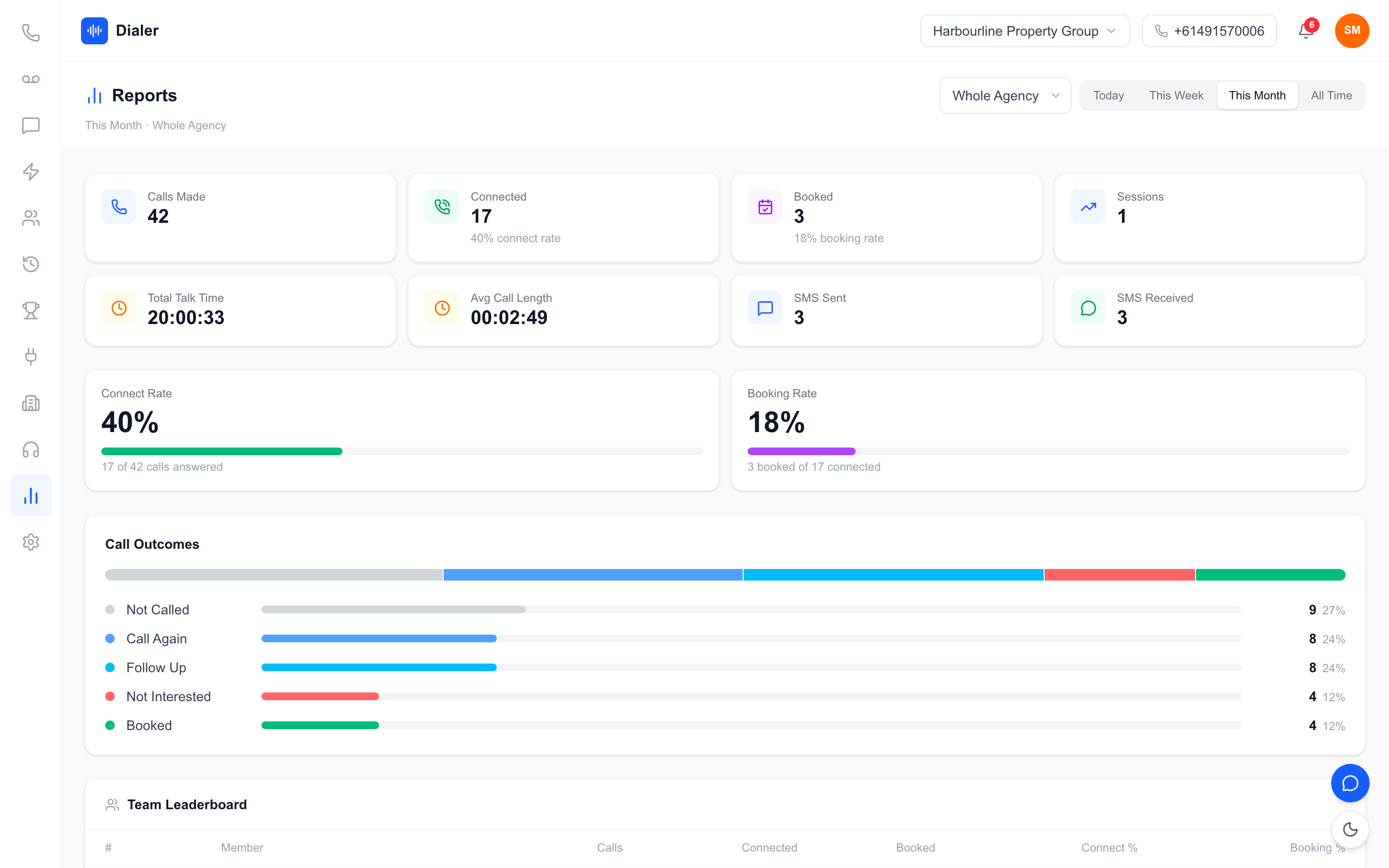
When the session ends it is saved to Session History, with totals for sessions, calls, pickup rate, appointments and total time. The Reports page rolls sessions up for today, this week, this month or all time, for the whole team or one rep: calls made, connected with connect rate, booked with booking rate, talk time, average call length, SMS sent and received, a call outcomes chart and a team leaderboard. Recorded calls also get a transcript and AI summary after the call ends.
Achievements and leaderboards
The same session data feeds the Achievements page: points, a day streak, a weekly goal, milestone badges and weekly and team leaderboards. Teams that like a little competition get it without anyone keeping a tally by hand.
What to check when choosing a dialler with live metrics
Use these questions on any shortlist, including ours. Our wider checklist on how to choose a power dialler in Australia covers pricing, numbers and imports too.
Does it count automatically?
Calls made and answer rate should update without the rep doing anything. If reps have to tick a box for every dial, the numbers will be wrong by lunchtime.
Can reps log the steps a phone cannot see?
Look for counters such as owner reached or pitch complete. Without them you see dials and bookings but nothing in between, which makes it hard to tell where calls are being lost.
Do live numbers roll up into per-rep reports?
Live metrics that vanish when the session ends are only half useful. Check that sessions are saved and that the reports can be filtered by rep and by period. It is also worth understanding the difference between dialling modes; see power dialer vs auto dialer for how they compare.
Test it with a real list
A demo list always connects. Import a real list, run two or three genuine calling blocks and watch how the live numbers behave and whether reps actually glance at them.
Conclusion: numbers that help while you dial
A power dialler with live call metrics gives reps feedback while it can still change the session: calls made, answer rate, call time and appointments, plus counters for the steps in between. Pair that with saved sessions and per-rep reports, and the same data serves the rep during the block and the manager at the weekly review.
To see it with your own leads, the Veyce power dialler for Australian teams shows live metrics beside every call. Plans and seat counts are on the Veyce pricing page, and the free trial runs for 3 days from your first call, with 100 calling minutes and no card.
Frequently asked questions
What is a power dialler with live call metrics?
It is a dialler that calls the next number for the rep after each call and also shows a running scoreboard for the current session. Typical live numbers are calls made, answer rate, total call time and appointments. Some tools, including Veyce, add counters reps tap for steps a phone system cannot detect, such as reaching the owner or completing the pitch, so the whole funnel is visible while the rep is still calling.
Which live call metrics matter most?
Calls made and answer rate matter most during a block, because they tell a rep whether they are on pace and whether the list is responding. Appointments show the result, and call time shows whether real conversations are happening. For teams selling to businesses, an owner-reached count is valuable because gatekeeper conversations look like answered calls but rarely lead to bookings. Keep the live panel to a handful of numbers.
What does Veyce show on its live metrics panel?
The Live Call Metrics panel on the Veyce calling screen shows today's session: Calls Made, Answer Rate, Duration (total call time in the session) and Appointments. Reps can tap counters for Owner Reached, Pitch Complete and Appointment Set. Each rep only sees their own session. When the session ends it is saved to Session History, and the Reports page rolls sessions up by period for the team or one rep.
Do live metrics replace weekly reports?
No. Live metrics help reps make decisions during a calling block, such as switching lists when answer rate drops. Weekly reports help managers see trends, compare reps fairly and plan lists and calling times. A single day can swing on one list, so decisions about people and process belong in the weekly view. The best setup saves every live session so the same data feeds both.
How can I test a dialler's live metrics before buying?
Run a trial with a real list, not the demo data, and do two or three genuine calling blocks. Watch whether calls made and answer rate update on their own, whether reps can log conversion steps quickly, and whether finished sessions appear in per-rep reports. The Veyce free trial runs for 3 days from your first call, with 100 calling minutes and no card, which is enough for a few real blocks.