To record and transcribe sales calls properly, you need three things in place before the first dial: a clear reason for recording, the right notice to the person on the other end, and a system that does the recording and transcription without anyone remembering to press a button. Get those right and every recorded call becomes audio, text and a short summary your team can actually use.
This is a practical setup guide for Australian sales teams. It covers the decisions to make first, six steps to record and transcribe sales calls from day one, the habits that keep recordings useful, and how the setup works in Veyce. It is general information, not legal advice; where the law matters, we point you to the source and suggest getting advice.
Before you record and transcribe sales calls
Decide why you are recording
Write down the purpose in one sentence. Typical reasons are reviewing calls to improve the script, settling disputes about what was offered, training new reps on real calls, and keeping a reliable record of each lead's history. The purpose shapes everything else: who gets access, how long you keep recordings, and what you tell the people you call.
Get advice on consent and notification
In Australia, recording a phone call can be covered by the federal Telecommunications (Interception and Access) Act 1979 and by state and territory surveillance or listening devices laws, and those laws are not the same across the country. Many businesses tell the other person at the start of every call that it is being recorded. Do not guess at the wording or rely on what another company does: get legal advice on what your team should say, especially if you call into several states.
Decide who can access recordings
Recordings and transcripts hold personal information: names, addresses, financial situations, sometimes health details mentioned in passing. Decide who needs access (usually reps for their own calls, plus managers) and check that your tools restrict playback to signed-in team members. If your business is covered by the Privacy Act, read the Australian Privacy Principles on collecting, storing and securing personal information.
Six steps to record and transcribe sales calls
Steps 1 and 2: choose where calls are placed, then switch recording on
Step one is to put every sales call through one system. If some reps dial from a desk app, some from their personal mobiles and some from a softphone, you will record and transcribe sales calls only some of the time, and the gaps will be the calls you most want to hear. A power dialler with recording built in solves this, because the dialler places the call, records it and stores the result.
Step two is to switch recording on in that system's settings and confirm it is on for the number your team calls from. Check it yourself rather than assuming the default.
Steps 3 and 4: add the notice to your script, then make test calls
Step three is to put the notice you settled on with your adviser at the top of your calling script, word for word, so every rep says the same thing. A short, natural line works better than a legal paragraph read at speed.
Step four is to make five or six test calls to colleagues' phones. Check that each one appears with a recording, that the audio is clear on both sides, and that a transcript and summary arrive afterwards. Try one call on a headset and one on a laptop microphone, so you can see the difference in transcript quality for yourself.
Steps 5 and 6: check the transcripts, then set a review routine
Step five is to read those test transcripts against the recordings. Note which names, suburbs or product terms the model gets wrong, and tell reps to check those details against the audio before quoting them.
Step six is to decide when recordings get reviewed. A worked example, with assumptions: a manager blocks 20 minutes each morning, scans the previous day's summaries, and reads the transcripts of three calls per rep, picked from the summaries. On a four-rep team that is twelve transcripts a day, which is realistic only because the summaries do the sorting. Adjust the numbers to your own call volume.
Keeping recordings and transcripts useful
Use consistent outcomes
A transcript is far easier to find when the call has a clear outcome attached: booked, callback, not interested, wrong number. Agree on the outcome list as a team and use it on every call. Reviewing "all booked calls this week" is only possible if booked calls are marked as booked.
Watch for calls that escape recording
Calls made outside your recording system leave holes in the record. A rep who calls a hot lead back from their personal mobile at 7pm produces no recording and no transcript. Make it a rule that sales calls go through the team system, and check the call history for leads with outcomes but no calls logged.
Share the good calls, not just the bad ones
Recording programmes go sour when reps feel the recordings exist only to catch mistakes. Balance it deliberately. Each week, pick one call that went well, play the key minute at the team meeting and put the transcript in a shared folder of examples. Over a quarter you build a library of your own best openings, objection handling and closes, written in your market's language. Reps start asking for their good calls to be shared, which is the clearest sign the habit has stuck.
Plan storage and deletion
Recordings build up quickly. Know where yours are stored, how long your provider keeps them, what happens when you close the account, and how you would answer a person who asks what you hold about them. Write the answers down once, so nobody has to work them out under pressure.
Veyce: record and transcribe sales calls from one dialler
Switching recording on
In Veyce, recording is switched on in Settings. Once it is on, calls made through your team's dedicated Australian number are recorded, and the recording is stored in your Veyce account with a playback link on the call. If you allow reps to call from their own phone, those calls use the rep's carrier and are not recorded or transcribed, which is worth knowing before you turn that option on.
What appears after each call
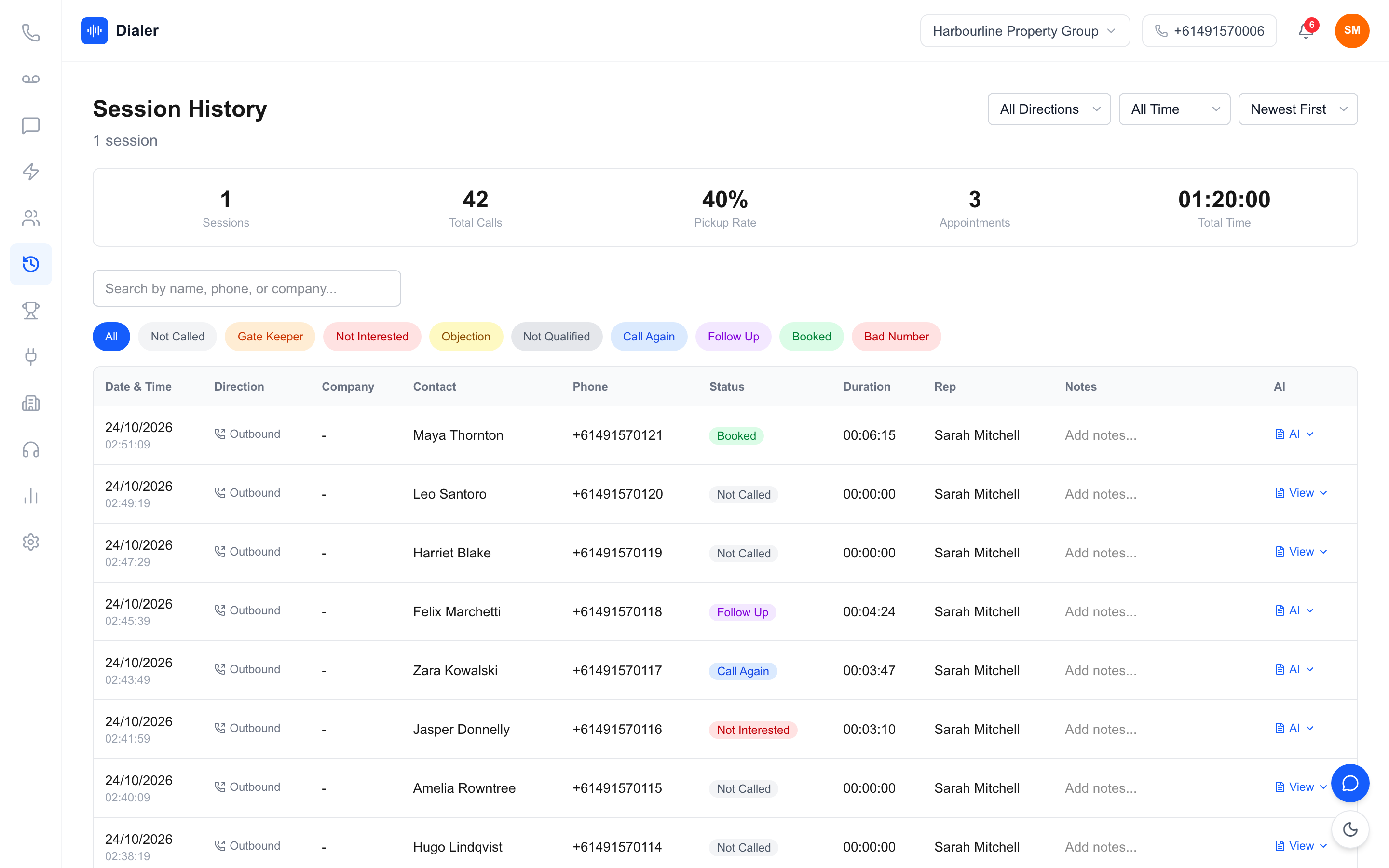
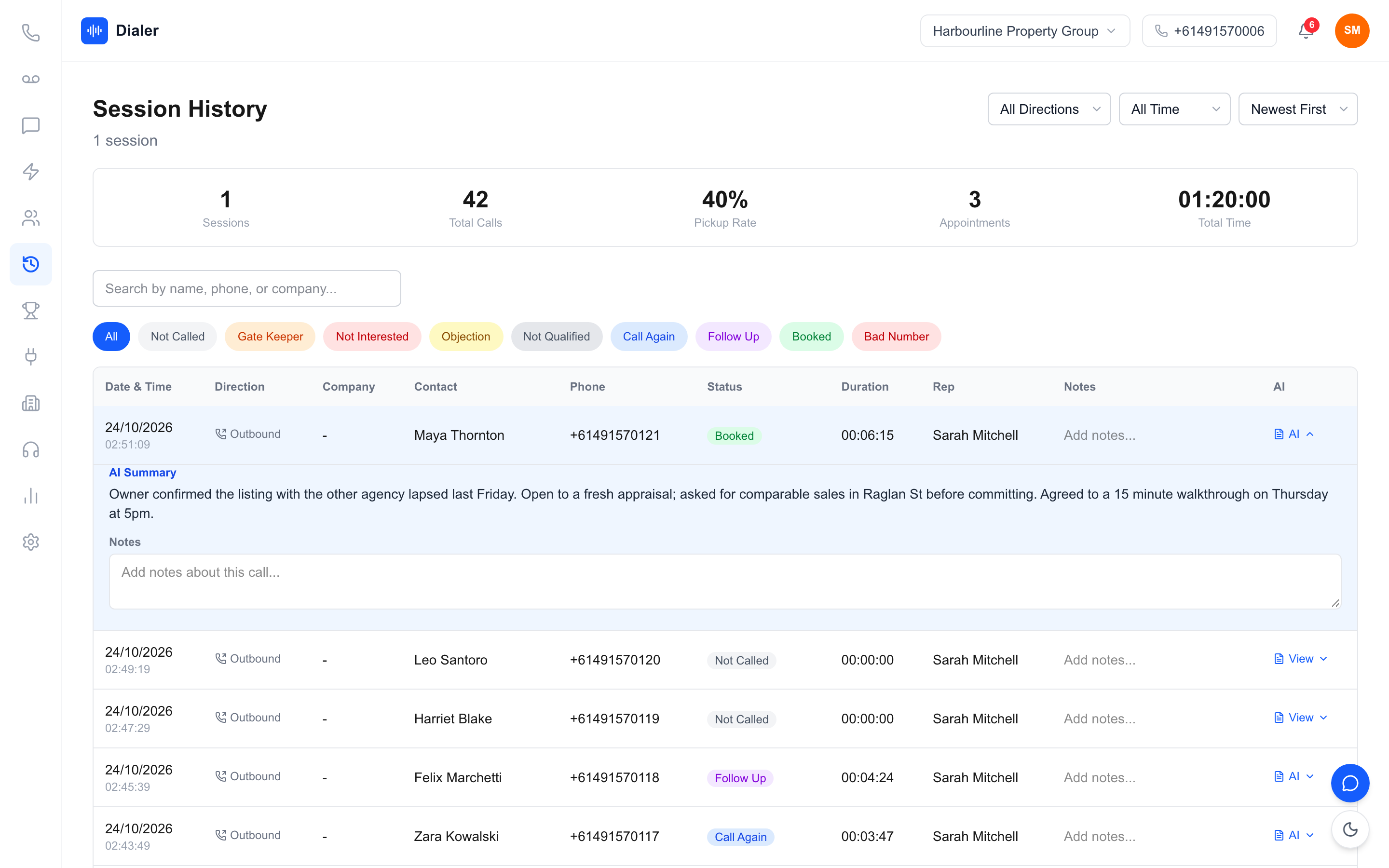
After a recorded call ends, Veyce transcribes it and adds a two or three sentence AI summary covering what the prospect said, their interest or objection, and the agreed next step. It typically arrives a minute or two after hang-up; nothing is transcribed while the call is live. The summary, full transcript and recording all sit on the call in session history. The same calls, with their outcomes, summaries and recordings, also show beside a lead's texts in Messages, so whoever calls that lead next can read the history first.
Plans and trial
Call recording with AI transcripts and summaries is included on Team at $179 a month, Growth at $449 and Agency at $1,099 for 25 seats, while Solo at $49 a month for one seat does not include call recording; compare the plans for seats and minutes. The full product tour is on the Australian power dialler page, and teams such as solar sales teams use the same setup to keep a record of every quote conversation.
Start recording with a plan, not a switch
The teams that get value when they record and transcribe sales calls are the ones that decided why, settled their notice wording with advice, put every call through one system and set a review time. The switch is the easy part. Pair your setup with a sharper opening, using our cold calling tips for Australian teams, and the transcripts will show you which lines are working.
When you are ready to test the calling side on your own list, start a free Veyce trial: 3 days from your first call, 100 calling minutes, no card, to try the dialler, lead import, scripts and session flow. Call recording with AI transcripts and summaries comes on the Team, Growth and Agency plans.
Frequently asked questions
What is the easiest way to record and transcribe sales calls?
Place every sales call through one system that records and transcribes automatically, such as a power dialler with recording built in. That removes the manual steps of exporting audio, uploading it to a separate tool and pasting text back into a CRM. Switch recording on, confirm it works with a few test calls, and check that transcripts and summaries appear on each call afterwards without anyone pressing a button.
Do I have to tell people I am recording the call?
Recording a phone call in Australia can be covered by the federal Telecommunications (Interception and Access) Act 1979 and by state and territory surveillance or listening devices laws, which differ from each other. Many businesses tell the other person at the start of every call that it is recorded. This guide is general information only, so get legal advice on exactly what your team should say before you start recording.
How long after a call is the transcript ready in Veyce?
Usually a minute or two after the call ends. Veyce transcribes recorded calls once they finish, never during the call, and adds a short AI summary covering what the prospect said, their interest or objection and the agreed next step. The summary, the full transcript and the recording then sit together on the call in session history. Calls that were not recorded, including calls from a rep's own phone, have no transcript.
Can reps record calls they make from their personal mobile?
Not through Veyce. If you allow reps to call from their own phone, those calls go over the rep's own carrier plan and are not recorded, transcribed or summarised. For a complete record, ask reps to place sales calls through the team's Veyce number from the dialler, where recording applies once it is switched on in Settings. Calls placed outside any team system leave gaps in a lead's history.
Who can listen to recorded calls in Veyce?
Call recordings in Veyce can only be played by signed-in members of the organisation that made the call. Recordings, transcripts and summaries are stored in your Veyce account as part of your account data, kept while the account is active, and deleted with the rest of your data after the account is closed. Veyce does not use your recordings or transcripts to train AI models.