Sales team call monitoring is the practice of reviewing how your reps' calls actually go, through recordings, call outcomes and, sometimes, listening to calls as they happen, so you can give useful feedback and spot problems before they cost you deals. For most Australian outbound teams the backbone of monitoring is not live listening at all. It is a steady habit of reviewing recorded calls, with numbers that tell you which calls are worth your time.
This guide shows how call recordings support sales reviews: what to listen for, how to pick the right calls when nobody has time to hear them all, how to run a review session that reps find useful, and where live listening fits in. It is written for team leaders, sales managers and principals running phone-based teams in real estate, solar, finance, insurance and B2B services.
What sales team call monitoring involves
Three layers of monitoring
It helps to separate monitoring into three layers, because each answers a different question:
- Activity numbers. Calls made, connected calls, bookings, talk time and outcomes per rep. They tell you who to look at, not what is wrong.
- Recorded call reviews. Listening back to a sample of calls, or reading summaries of them, to understand how reps open, handle objections and close. This is where most improvement comes from.
- Live listening. Hearing a call while it happens, and occasionally stepping in. Useful for new reps and difficult calls, but expensive in manager time.
Most teams over-invest in the first layer and under-invest in the second. A dashboard full of call counts feels like monitoring, but it cannot tell you why a rep with a high connect rate books nothing.
What recordings tell you that numbers cannot
A recording shows the first ten seconds of the call, which is often where it is won or lost. It shows whether the rep asked questions or launched into a pitch, how they handled "just send me an email", and whether a booking was firm or vague. None of that appears in a report. Recordings also protect reps: if a lead later disputes what was said, the call is there.
Be open with your team and your leads
Tell your reps clearly which calls are recorded, who can listen and what the recordings are used for. Monitoring that feels secretive damages trust faster than any feedback can build it. Rules on workplace surveillance and on recording calls differ between states, so get advice for your situation; in New South Wales, for example, the Workplace Surveillance Act 2005 applies to some forms of workplace monitoring. Agree a standard way to tell leads a call is recorded and put it in your script.
Using call recordings in sales reviews
Pick calls with the numbers, then listen
Nobody can listen to every call. Use your activity numbers to choose a small, targeted sample each week:
- High connect rate, low booking rate. The rep is getting conversations but not converting. Listen to three of their longer calls that ended Not Interested.
- Very short connected calls. Lots of answered calls under a minute can mean a weak opener. Listen to the first thirty seconds of five of them.
- Bookings that did not show. Listen to the booking call to hear how firm the commitment really was.
- Your best rep's best calls. Monitoring is not only for problems. A great call is the best training material you have.
What to listen for
Keep a short, consistent checklist so reviews do not wander:
- The opener: did the rep say who they are and why they are calling, quickly and clearly?
- Questions: did they ask before they pitched?
- Objections: did they acknowledge and respond, or argue and retreat?
- The ask: did they ask for a specific next step with a day and time?
- The wrap-up: was the outcome tagged correctly, with notes another rep could use?
Score each call on these five points. Over a month, patterns appear that a single call never shows.
Read summaries first when time is short
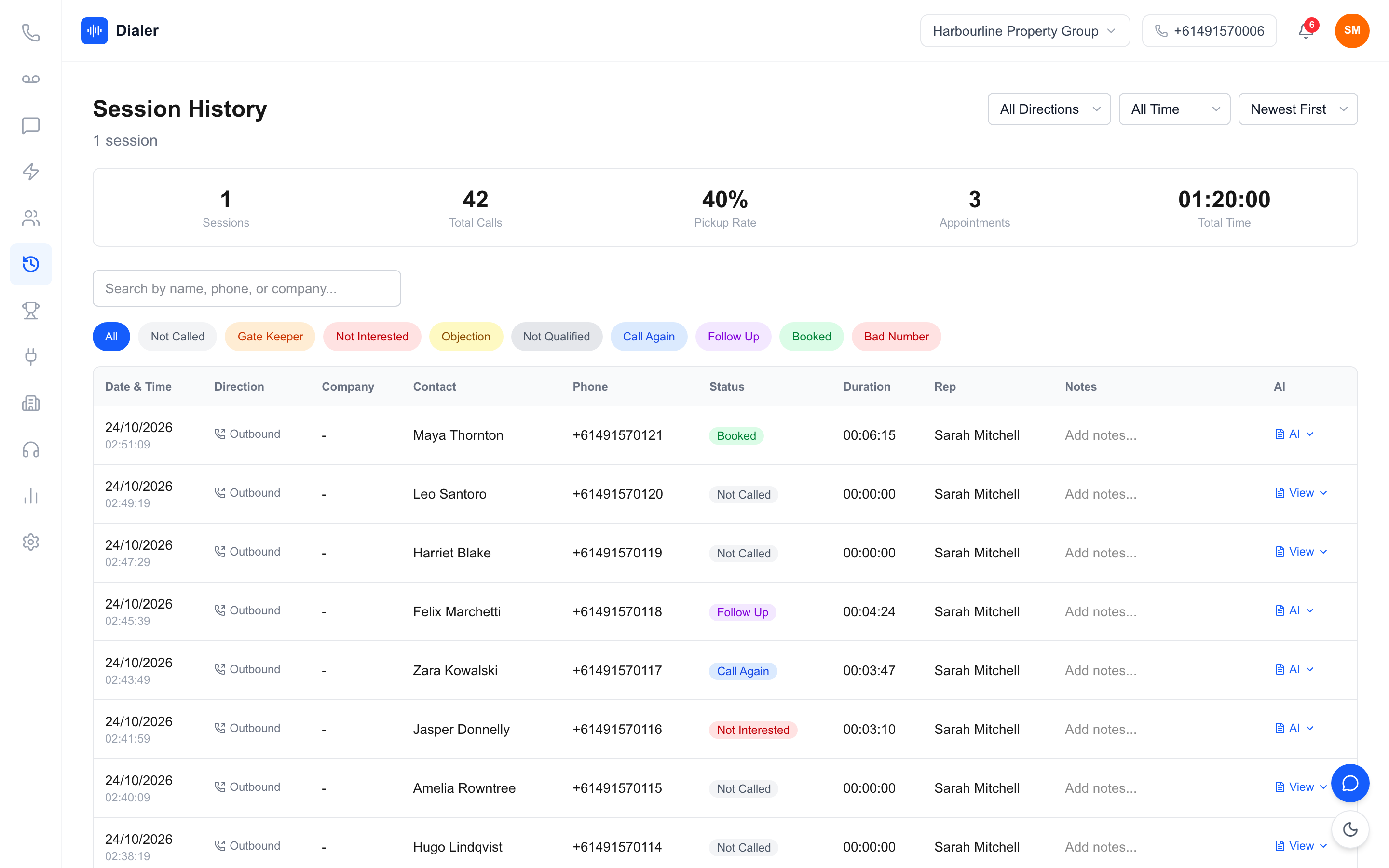
Written call summaries make a review much faster. Instead of scrubbing through a recording to find the objection, a manager reads a few lines about what was discussed and what was agreed, then jumps to the part of the recording worth hearing. It also lets a manager check twenty calls in the time it takes to listen to two.
A worked example of review time
This is an illustration with assumptions, not measured data. Assume a manager wants to review 10 calls per rep each week for a team of 4 reps, and the average connected call lasts 4 minutes. Listening to every one in full takes 40 calls x 4 minutes = 160 minutes, before any notes. If the manager reads each summary first (assume 1 minute each) and only listens in full to the 1 in 4 calls that look worth it, the time becomes 40 minutes of reading plus 10 calls x 4 minutes = 80 minutes. Your own call lengths and review habits will change the numbers; the point is that summaries let you choose where to spend listening time. Start a free 7-day Veyce trial with 50 calling minutes included.
Running a review session reps value
Keep it short and regular
A fifteen-minute one-to-one each week beats an hour-long review once a quarter. Play one good call and one call to improve. Ask the rep what they heard before you say anything; reps often spot their own mistakes, and they remember the lesson better when they found it.
Turn findings into one change at a time
End every review with one specific thing to try on the next session, such as "ask one question before the pitch" or "offer two appointment times instead of asking when suits". Check the next week's recordings for that one change. Five suggestions at once means none of them stick.
Share great calls with the whole team
Build a small library of strong calls: a clean opener, a well-handled price objection, a firm booking. Play one at the weekly team meeting. New starters learn faster from hearing a teammate do it well than from reading a script.
Veyce: recordings, summaries and a Live monitor
Recordings and AI summaries after every recorded call
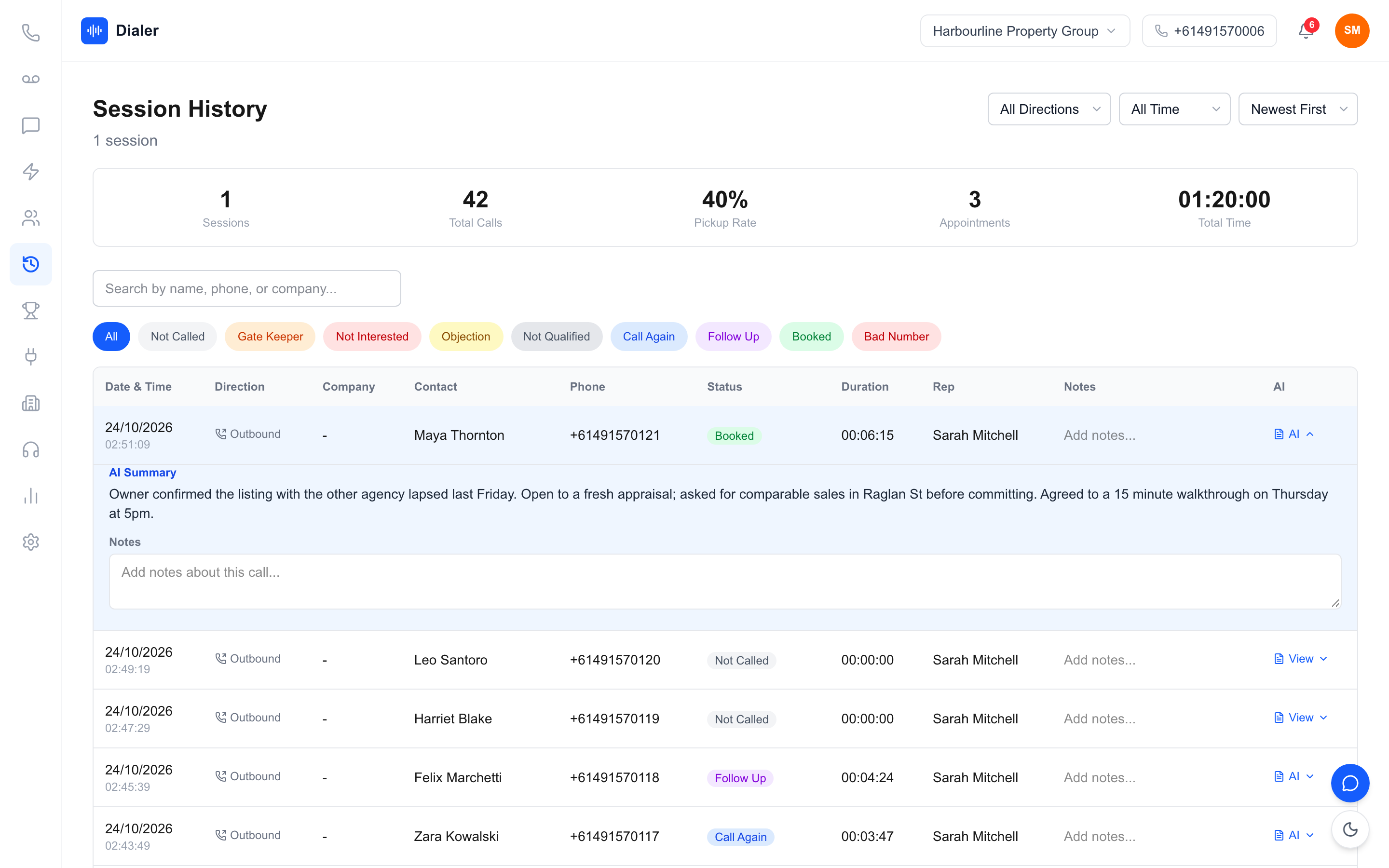
In Veyce, a power dialler built for Australian sales teams, calls can be recorded, and every recorded call gets an AI transcript and summary after the call ends. Summaries are not produced in real time; they arrive shortly after the call, for recorded calls only. In Session History, calls can be filtered by outcome (Gate Keeper, Not Interested, Objection, Call Again, Follow Up, Booked and more), searched by name, phone or company, and opened to read the summary or play the recording. For a deeper look at summaries, see our guide to AI call summaries for sales teams.
Numbers that tell you which calls to review
Owners and managers get Reports, filtered by Today, This Week, This Month or All Time, for the whole agency or one rep: calls made, connected, booked, connect rate, booking rate, total talk time, average call length and a call outcomes breakdown. A Team Leaderboard lists every rep with the same rates, so the "high connect, low booking" rep is easy to find.
Live monitor on Growth and Agency
Owners and managers on the Growth and Agency plans also get a Live monitor. It shows every rep as online, away or offline, their calls as they happen (dialling, ringing, talking with a timer, waiting or on hold), and today's calls, conversations and talk minutes per rep, refreshing every few seconds. On Parallel Dialer calls, a manager can Listen (muted, so neither the rep nor the lead hears them), Whisper (only the rep hears) or Barge (both the rep and the lead hear). Listening is not available on regular Power Dialler calls, which show on the monitor without the Listen buttons. The Parallel Dialer is an add-on for Growth and Agency at $99 a seat a month.
Plans
Call recordings with AI transcripts and summaries come on the Team ($179 a month), Growth ($449) and Agency ($1,099) plans; Solo at $49 a month does not include call recording. Growth is $449 a month with 10 seats and 1,000 minutes. See what each Veyce plan includes.
Conclusion: monitor with recordings, not just dashboards
Sales team call monitoring pays off when numbers point you to the right calls and recordings show you what is happening on them. Choose a small weekly sample using connect and booking rates, review against a five-point checklist, read summaries first to save time, and turn each review into one change for the next session. Use live listening for new reps and tricky calls, not as your main tool, and be open with your team about what is recorded.
To try the dialler with your own calls, start a free trial: 3 days from your first call and 100 calling minutes, no card. Import your own list, run a session with your script and see how the session flow suits your team; call recording with AI transcripts and summaries comes on the Team, Growth and Agency plans.
Frequently asked questions
What is sales team call monitoring?
It is the regular review of how reps' calls go, using activity numbers, recorded calls and sometimes live listening. Numbers such as connect rate and booking rate show which reps and calls need attention, recordings show what actually happened on those calls, and live listening helps with new starters or difficult calls. The aim is useful feedback that improves bookings, not surveillance, so be open with your team about what is recorded and why.
How many sales calls should a manager review each week?
There is no fixed number, but a small, targeted sample reviewed consistently beats a large sample reviewed occasionally. Many managers start with a handful of calls per rep each week, chosen with the numbers: long calls that ended Not Interested, very short connected calls, bookings that did not show and the rep's best call. Reading summaries first lets you check more calls in the same time and listen in full only where it matters.
Is it legal to record and monitor sales calls in Australia?
It depends on the state and on how you notify your staff and the people you call. Workplace surveillance and call recording rules differ between jurisdictions; New South Wales, for example, has the Workplace Surveillance Act 2005. Get legal advice for your situation, tell your reps clearly which calls are recorded and who can listen, and agree a standard way to tell leads a call is recorded. Software cannot make your monitoring compliant on its own.
Can managers listen to live calls in Veyce?
Yes, with limits. Owners and managers on Growth and Agency have a Live monitor that shows every rep's presence, live calls and today's numbers, refreshing every few seconds. On Parallel Dialer calls they can Listen muted, Whisper so only the rep hears, or Barge so both sides hear. Listening is not available on regular Power Dialler calls. The Parallel Dialer is a $99 a seat add-on on Growth and Agency.
Does Veyce transcribe calls in real time?
No. Veyce records calls and produces an AI transcript and summary after each recorded call ends, not during it. Calls that are not recorded do not get a summary. Managers can filter Session History by outcome, open a call and read its summary, then play the recording for the part worth hearing. Recordings with transcripts and summaries come on the Team ($179 a month), Growth ($449) and Agency ($1,099) plans; Solo and the free trial, which runs 3 days from your first call with 100 calling minutes, do not include call recording.